Cisco Meraki MR26
| abgn (AN900) | |
|---|---|
| 802.11n Dual-Radio Dual-Band Wireless Indoor Access Point | |
 | |
| Wikipedia | Cisco Systems |
| WikiDevi.wi-cat.ru | Cisco Meraki MR26 |
| 3rd Party Firmware | |
| dd-wrt | Status Unknown |
| OpenWrt | Supported |
| Tomato any flavor | Status Unknown |
| Gargoyle | Status Unknown |
| Platform | |
| Brand • Model • Rev | Cisco Meraki MR26-HW |
| FCC ID | UDX-60027010 |
| IC ID | 6961A-60027010 |
| Type | managed access point |
CPU1  | Broadcom BCM53015 |
| CPU1 Type | ARM Cortex-A9 |
| CPU1 Speed | 800 MHz ( 2 cores ) |
| Flash1 Chip | Spansion S34ML01G100TF100 |
| Flash1 Size | 128 MiB 134,217,728 B <br />1,048,576 Kib <br />131,072 KiB <br />1,024 Mib <br />0.125 GiB <br /> (SLC NAND) |
| RAM1 Size | 128 MiB 134,217,728 B <br />1,048,576 Kib <br />131,072 KiB <br />1,024 Mib <br />0.125 GiB <br /> (DDR3 SDRAM) |
| RAM1 Chip | SK hynix H5TQ1G63EFR-H9C |
| ETH chip1 | Broadcom BCM53015 |
| Ethernet Port Count | 1-1GbE-LAN |
| Wired Standard | IEEE 802.3i/3u/3ab |
| Stock bootloader | U-Boot 2012.10 00063-g83f9fe4 |
| Stock FW OS | Linux 3.4-r23 |
| Expansion IF types | none specified |
| PoE | 802.3at, 802.3af, standard |
| Power | 12 VDC, 1.5 A |
| Connector type |
barrel 5.5 mm (OD) 2.5 mm (ID) 9.5 mm (LEN) |
| Serial Port (UART) | yes, 4-pin header, populated, 3.3V TTL, (115200 8N1), J3 |
| JTAG Port | yes, 20-pin header, unpopulated, J5 |
|
| |
|
Additional chips | |
| Other | |
|
| |
| 3rd Party Firmware Support |
OpenWrt • (List | Dev | DLs) |
| Retail | |
| Availability | End of Life |
| End of Life date | 09 May 2023 |
| FCC approval date | 29 January 2014 |
| (Est.) release date | March 2014 |
| ASIN |
B00ISCJ382  |
| Country of manuf | Taiwan |
| Radio 1 | |
| Chip1 | Broadcom BCM43431 |
| Wireless interface OUI | 00:18:0A |
| Antenna Connector Type | U.FL |
| MIMO status | 3x3:3 |
| Wireless Standard | IEEE 802.11b/g/n |
| 802.11n | up to 450 Mbps |
| 802.11g | up to 54 Mbps |
| 802.11b | up to 11 Mbps |
| WiFi Operating Frequency | 2.4 GHz |
| Radio 2 | |
| Chip1 | Broadcom BCM43431 |
| Wireless interface OUI | 00:18:0A |
| Antenna Connector Type | U.FL |
| MIMO status | 3x3:3 |
| Wireless Standard | IEEE 802.11a/n |
| 802.11n | up to 450 Mbps |
| 802.11a | up to 54 Mbps |
| WiFi Operating Frequency | 5 GHz |
| Radio 3 | |
| Chip1 | Broadcom BCM43428 |
| Wireless interface OUI | 00:18:0A |
| Antenna Connector Type | U.FL |
| MIMO status | 1x1:1 |
| Wireless Standard | IEEE 802.11a/b/g/n |
| WiFi Operating Frequency | 2.4 or 5 GHz |
For a list of all currently documented Broadcom chipsets with specifications, see Broadcom.
For a list of all currently documented Cisco devices with specifications, see Cisco.
Overview
Two dual-band 3x3 MIMO 802.11n radios and 1x1 dual-band WIFI dedicated to scanning
Hardware specification
- CPU: Broadcom BCM53015A1 Dual-Core ARM (Cortex-A9) @800MHz
- Memory: 128MB (DDR3) SDRAM
- Storage: 128MB (SLC NAND) Flash
- WiFi: 2x Broadcom BCM43431 802.11abgn (3x3:3)
- Broadcom BCM43428 802.11abgn (1x1:1)
- Network: 1x Gigabit Ethernet ports
- Power: 12V, 1.5A via barrel or 802.3at PoE
Flashing
 | NOTE: During configuration or flashing a device, the only things that should be hooked to the device is the computer and power. |
Flashing OpenWrt
 | Devices with Broadcom WiFi chipsets have limited OpenWrt supportability (due to limited FLOSS driver availability for Broadcom chips). Consider this when choosing a device to buy, or when deciding to flash OpenWrt on your device because it is listed as supported. See Broadcom WiFi for details. |
Subtarget: generic
Package architecture: arm_cortex-a9
Supported Since Commit
Support started version: 23.05.0
Current supported version: 24.10.4
Installation method(s):
see git-commit
This flashing procedure for the MR26 was tested with firmware:
   "22-143410M-gf25cbf5a-asa".
   U-Boot 2012.10-00063-g83f9fe4 (Jun 04 2014 - 21:22:39)
A guide how to open up the device is available on the wiki:
<https://openwrt.org/toh/meraki/mr26>
Notes:
- The WIFI do work to a degree. Limited to 802.11bg in the 2.4GHz band.
- the WIFI macs are made up.
0. Create a separate Ethernet LAN which can't have access to the internet.
  Ideally use 192.168.1.2 for your PC. The new OpenWrt firmware will setup
  the network via DHCP Discovery, so make sure your PC is running
  a DHCP-Server (i.e.: dnsmasq)
  '# dnsmasq -i eth# -F 192.168.1.5,192.168.1.50
  Download the openwrt-meraki-mr26 initramfs file from openwrt.org and
  rename it to something simple like mr26.bin. Then put it into the tftp's
  server directory.
1. Disassemble the MR26 device by removing all screws (4 screws are located
  under the 4 rubber feets!) and prying open the plastic covers without
  breaking the plastic retention clips. Once inside, remove the plastic
  back casing. Be careful, there some "hidden" retention clips on both
  sides of the LAN port, you need a light to see those. Next, you want to
  remove all the screws on the outer metal shielding to get to the PCB.
  It's not necessary to remove the antennas!
2. Connect the serial cable to the serial header and Ethernet patch cable
to the device.
4. Before connecting the power, get ready flood the serial console program
  with the magic:   xyzzy  . This is necessary in order to get into the
  u-boot prompt. Once Ready: connect power cable.
5. If you don't get the "u-boot>" prompt within the first few seconds,
you have to disconnect and reconnect the power cable and try again.
6. In the u-boot prompt enter:
  setenv ipaddr 192.168.1.4
  setenv serverip 192.168.1.2
  tftpboot ${meraki_loadaddr} mr26.bin; bootm
this will boot a in-ram-only OpenWrt image.
7. Once it booted use sysupgrade to permanently install OpenWrt.
  To do this: Download the latest sysupgrade.bin file and move
  it to the device. Then use sysupgrade *sysupgrade.bin to install it.
WARNING: DO NOT DELETE the "storage" ubi volume!
Pictures
-
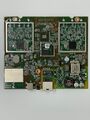 Board top
 -
 Board bottom


See also
- Cisco
- Meraki
- Embedded system/managed access point
- Embedded System Broadcom
- Embedded System BCM53015
- Broadcom
- Embedded System ARM
- Embedded System Cortex-A9
- OpenWrt Supported
- Embedded System BCM43431
- Has Mimo Status
- Embedded System IEEE 802.11b/g/n
- Embedded System IEEE 802.11a/n
- Embedded System BCM43428
- Embedded System IEEE 802.11a/b/g/n
- Triple-Radio Wireless Embedded System
- Wireless Embedded System
- Dual-Band
- Embedded System
- English Documentation


