Cudy WR1000 V1
| abgn+ac (AC1200) | |
|---|---|
| AC1200 Dual Band Smart Wi-Fi Router | |
 | |
| Homepage | Product page |
| WikiDevi.wi-cat.ru | Cudy WR1000 V1 |
| 3rd Party Firmware | |
| dd-wrt | Status Unknown |
| OpenWrt | Supported |
| Tomato any flavor | Incompatible |
| Gargoyle | Status Unknown |
| Platform | |
| Brand • Model • Rev | Cudy WR1000 V1 |
| Serial number prefix | WR1000 |
| FCC ID | 2APRGWR1000V1 |
| Board ID | 4285073C |
| Type | wireless router |
CPU1  | MediaTek MT7628A |
| CPU1 Type | MIPS 24KEc |
| CPU1 Speed | 580 MHz |
| Flash1 Chip | Winbond W25Q64JVSIQ |
| Flash1 Size | 8 MiB 8,388,608 B <br />65,536 Kib <br />8,192 KiB <br />64 Mib <br />0.00781 GiB <br /> |
| RAM1 Size | 64 MiB 67,108,864 B <br />524,288 Kib <br />65,536 KiB <br />512 Mib <br />0.0625 GiB <br /> (DDR2) |
| RAM1 Chip | Winbond W9751G6KB-25 |
| ETH chip1 | MediaTek MT7628A |
| Switch | MediaTek MT7628A |
| Ethernet Port Count |
1-100MbE-WAN 2-100MbE-LAN |
| Wired Standard | IEEE 802.3i/3u |
| Stock bootloader | U-Boot |
| Expansion IF types | none specified |
| Power | 12 VDC, 1 A |
| Connector type |
barrel 5.5 mm (OD) 2.1 mm (ID) 9.5 mm (LEN) |
| Serial Port (UART) | yes, 4-pin header, 3.3V TTL, (57600 8N1) |
|
| |
|
| |
| Other | |
|
Default SSID: JCG-XXXXXX-2.4G | |
| 3rd Party Firmware Support |
OpenWrt • (List | Dev | DLs) |
| Retail | |
| Availability | End of Life |
| End of Life date | 2023 |
| FCC approval date | 06 August 2018 |
| UPC |
731717225713 (UPC DB, On eBay) |
| EAN |
6971690790011 (UPC DB, On eBay) |
| ASIN |
B07FR6Q8XG  |
| Country of manuf | China |
| Radio 1 | |
| Chip1 | MediaTek MT7628A |
| Wireless interface OUI | 00:E0:4C, 70:79:38, B4:4B:D6 |
| Antenna Connector Type | soldered |
| MIMO status | 2x2:2 |
| Wireless Standard | IEEE 802.11b/g/n |
| 802.11n | up to 300 Mbps |
| 802.11g | up to 54 Mbps |
| 802.11b | up to 11 Mbps |
| WiFi Operating Frequency | 2.4 GHz |
| Radio 2 | |
| Chip1 | MediaTek MT7612E |
| Wireless interface OUI | 00:E0:4C, 70:79:38, B4:4B:D6 |
| Antenna Connector Type | soldered |
| MIMO status | 2x2:2 |
| Wireless Standard | IEEE 802.11a/n/ac |
| 802.11ac | up to 867 Mbps |
| 802.11n | up to 300 Mbps |
| 802.11a | up to 54 Mbps |
| WiFi Operating Frequency | 5 GHz |
For a list of all currently documented MediaTek chipsets with specifications, see MediaTek.
For a list of all currently documented Cudy devices with specifications, see Cudy.
Overview
The CPU ID is MediaTek MT7628A. The used speed is 580MHz. Works also with OpenWrt Image wl-wn575a3-squashfs-sysupgrade.bin. Only the LEDs for WiFi do not work.
Flashing
 | NOTE: During configuration or flashing a device, the only things that should be hooked to the device is the computer and power. |
Flashing OpenWrt
 | This device is NOT RECOMMENDED for future use with OpenWrt due to low flash/ram.
DO NOT BUY DEVICES WITH 8MB FLASH / 64MB RAM if you intend to flash an up-to-date and secure OpenWrt version onto it! See 8/64 warning for details. This device does not have sufficient resources (flash and/or RAM) to provide secure and reliable operation. This means that you will not be able to install many packages, and that you might experience crashes due to OOM situations more or less often. See OpenWrt on 8/64 devices what you can do now. |
Subtarget: mt76x8
Package architecture: mipsel_24kc
Supported Since Commit
Support started version: 19.07.0
Current supported version: 25.12.2
WLAN Hardware: MediaTek MT7628A, MediaTek MT7612E
WLAN Comment: 2x2:2 MIMO both channels
Installation method(s):
GUI OEM, see git-commit
Recovery method(s):
see git-commit
| git • >> |
|---|
ramips: add CUDY WR1000 support
Cudy WR1200 is an AC1200 AP with 3-port FE and 2 non-detachable antennas

Specifications:

MT7628 (580 MHz)
64 MB of RAM (DDR2)
8 MB of FLASH
2T2R 2.4 GHz (MT7628)
2T2R 5 GHz (MT7612E)
3x 10/100 Mbps Ethernet (2 LAN + 1 WAN)
2x external, non-detachable antennas (5dbi)
UART header on PCB (57600 8n1)
7x LED, 2x button

Known issues:
The Power LED is always ON, probably because it is connected
directly to power.

Flash instructions
------------------
Load the ...-factory.bin image via the stock web interface.

Openwrt upgrade instructions
----------------------------
Use the ...-sysupgrade.bin image for future upgrades.

Revert to stock FW
------------------
Warning! This tutorial will work only with the following OEM FW:
  WR1000_EU_92.122.2.4987.201806261618.bin
  WR1000_US_92.122.2.4987.201806261609.bin
If in the future these firmwares will not be available anymore,
you have to find the new XOR key.

1) Download the original FW from the Cudy website.

   (For example WR1000_EU_92.122.2.4987.201806261618.bin)

2) Remove the header.

   dd if="WR1000_EU_92.122.2.4987.201806261618.bin" of="WR1000_EU_92.122.2.4987.201806261618.bin.mod" skip=8 bs=64

3) XOR the new file with the region key.

   FOR EU: 7B76741E67594351555042461D625F4545514B1B03050208000603020803000D
   FOR US: 7B76741E675943555D5442461D625F454555431F03050208000603060007010C

   You can use OpenWrt's tools/firmware-utils/src/xorimage.c tool for this:

   xorimage -i WR1000..bin.mod -o stock-firmware.bin -x -p 7B767..

   Or, you can use this tool (CHANGE THE XOR KEY ACCORDINGLY!):
   https://gchq.github.io/CyberChef/#recipe=XOR(%7B'option':'Hex','string':''%7D,'',false)

4) Check the resulting decrypted image.

   Check if bytes from 0x20 to 0x3f are:
   4C 69 6E 75 78 20 4B 65 72 6E 65 6C 20 49 6D 61 67 65 00 00 00 00 00 00 00 00 00 00 00 00 00 00

   Alternatively, you can use u-boot's tool dumpimage tool to check
   if the decryption was successful. It should look like:

   # dumpimage -l stock-firmware.bin
   Image Name:   Linux Kernel Image
   Created:      Tue Jun 26 10:24:54 2018
   Image Type:   MIPS Linux Kernel Image (lzma compressed)
   Data Size:    4406635 Bytes = 4303.35 KiB = 4.20 MiB
   Load Address: 80000000
   Entry Point:  8000c150

5) Flash it via forced firmware upgrade and don't "Keep Settings"

   CLI: sysupgrade -F -n stock-firmware.bin

   LuCI: make sure to click on the "Keep settings" checkbox
         to disable it. You'll need to do this !TWICE! because
         on the first try, LuCI will refuse the image and reset
	 the "Keep settings" to enable. However a new
         "Force upgrade" checkbox will appear as well.
         Make sure to do this very carefully!
|
Pictures


-
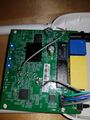 Top of board with soldered serial port
 -
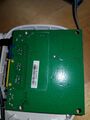 Bottom of board with soldered serial port


See also
 | This article's use of red links may need cleanup. |
|
|
- Cudy
- Embedded system/wireless router
- Embedded System MediaTek
- Embedded System MT7628A
- MediaTek
- Embedded System MIPS 24KEc
- Embedded System
- OpenWrt Supported
- Has Mimo Status
- Embedded System IEEE 802.11b/g/n
- Embedded System MT7612E
- Embedded System IEEE 802.11a/n/ac
- Dual-Radio Wireless Embedded System
- Wireless Embedded System
- Dual-Band
- English Documentation


