GL.iNet GL-MT1300 (Beryl)
From TechInfoDepot
Jump to navigationJump to search
| abgn+ac (AC1300) | |
|---|---|
| Pocket-Sized Travel Router | |
 | |
| Homepage | Product page |
| 3rd Party Firmware | |
| dd-wrt | Status Unknown |
| OpenWrt | Partial Support |
| Tomato any flavor | Incompatible |
| Gargoyle | Status Unknown |
| Platform | |
| Brand • Model • Rev | GL.iNet GL-MT1300 (Beryl) |
| FCC ID | 2AFIW-MT1300 |
| Type | travel router |
CPU1  | MediaTek MT7621A |
| CPU1 Type | MIPS 1004Kc |
| CPU1 Speed | 880 MHz ( 2 cores ) 16-bit |
| Flash1 Chip | Winbond W25Q256JVFQ |
| Flash1 Size | 32 MiB 33,554,432 B <br />262,144 Kib <br />32,768 KiB <br />256 Mib <br />0.0313 GiB <br /> |
| RAM1 Size | 256 MiB 268,435,456 B <br />2,097,152 Kib <br />262,144 KiB <br />2,048 Mib <br />0.25 GiB <br /> |
| RAM1 Chip | Nanya NT5CC128M16IP-DI |
| ETH chip1 | MediaTek MT7621A |
| Switch | MediaTek MT7621A |
| Ethernet Port Count |
1-1GbE-WAN 2-1GbE-LAN |
| Wired Standard | IEEE 802.3i/3u/3ab |
| Stock bootloader | U-Boot 1.1.3 Ralink 5.0.0.0 |
| Stock FW OS | Linux 5.10.176 OpenWrt 22.03.4 |
| Expansion IF types | microSD, USB 3.0 |
| USB ports | 1 |
| SD/MMC Slots | 1 |
| USB Hub Compatible | Untested |
| Power | 5 VDC, 3 A |
| Connector type | USB Female (Type-C) |
| Serial Port (UART) | yes, 3-pin header, populated, 3.3V TTL, (115200 8N1) |
|
Flags: | |
|
Additional chips | |
| Other | |
|
Default SSID: GL-MT1300-XXX | |
| Manuf/OEM/ODM | SGT |
| 3rd Party Firmware Support |
OpenWrt • (List | Dev | DLs) |
| Retail | |
| FCC approval date | 21 October 2020 |
| (Est.) release date | November 2020 |
| Newegg | 9SIAG7MK4H8251 |
| ASIN |
B08MKZXGBY  |
| Country of manuf | China |
| Radio 1 | |
| Chip1 | MediaTek MT7615D |
| Wireless interface OUI | 94:83:C4 |
| Antenna Connector Type | none specified |
| MIMO status | 2x2:2 |
| Wireless Standard | IEEE 802.11a/b/g/n/ac |
| 802.11ac | up to 867 Mbps |
| n-QAM | up to 400 Mbps |
| 802.11n | up to 300/300 Mbps |
| 802.11g | up to 54 Mbps |
| 802.11b | up to 11 Mbps |
| 802.11a | up to 54 Mbps |
| WiFi Operating Frequency |
2.4 or 5 ==Overview== GHz |
For a list of all currently documented MediaTek chipsets with specifications, see MediaTek.
For a list of all currently documented GL.iNet devices with specifications, see GL.iNet.
Overview
"MT1300-V1.1" is silk-screened on board.
Hardware specification
- CPU: MediaTek MT7621A @880MHz
- SoC: Dual-core (MIPS 1004Kc)
- Storage: 32MB Dual/Quad SPI Flash,
- TF card/MMC card slot
- Memory: 256MB (DDR3L) RAM
- USB: 1x USB 3.0 port
- Wi-Fi: MediaTek MT7615DN
- 802.11abgn/ac Dual Band (2.4/5GHz)
- 2×2 2.4GHz + 2×2 5GHz
- Network: 3x 1GbE (LAN) ports
- Power Source: 5V/2A via USB Type-C
Links of Interest
Reviews
- GL.iNet Beryl travel router review on ZDNET
- GL-iNet GL-MT1300 Beryl pocket sized travel router on The Gadgeteer
Flashing
 | NOTE: During configuration or flashing a device, the only things that should be hooked to the device is the computer and power. |
Flashing OpenWrt
Target: ramips
Subtarget: mt7621
Package architecture: mipsel_24kc
Supported Since Commit
Support started version: 21.02.0
Current supported version: 25.12.3
Subtarget: mt7621
Package architecture: mipsel_24kc
Supported Since Commit
Support started version: 21.02.0
Current supported version: 25.12.3
Unsupported Functions:
Bluetooth
LAN Hardware: MediaTek MT7621AT
WLAN Hardware: MediaTek MT7615DN
WLAN Comment: MIMO 2x2:2 on both bands, 2 non-detachable antennas
Installation method(s):
GL.Inet installation, U-Boot web recovery, see git-commit
Recovery method(s):
U-Boot web recovery
Bluetooth
LAN Hardware: MediaTek MT7621AT
WLAN Hardware: MediaTek MT7615DN
WLAN Comment: MIMO 2x2:2 on both bands, 2 non-detachable antennas
Installation method(s):
GL.Inet installation, U-Boot web recovery, see git-commit
Recovery method(s):
U-Boot web recovery
| git • >> |
|---|
ramips: add support for GL.iNet GL-MT1300 The GL-MT1300 is a high-performance new generation pocket-sized router that offers a powerful hardware and first-class cybersecurity protocol with unique and modern design. Specifications: - SoC: MT7621A, Dual-Core @880MHz - RAM: 256 MB DDR3 - Flash: 32 MB - Ethernet: 3 x 10/100/1000: 2 x LAN + 1 x WAN - Wireless: 1 x MT7615D Dual-Band 2.4GHz(400Mbps) + 5GHz(867Mbps) - USB: 1 x USB 3.0 port - Slot: 1 x MicroSD card slot - Button: 1 x Reset button - Switch: 1 x Mode switch - LED: 1 x Blue LED + 1 x White LED MAC addresses based on vendor firmware: WAN : factory 0x4000 LAN : Mac from factory 0x4000 + 1 2.4GHz : factory 0x4 5GHz : Mac form factory 0x4 + 1 Flashing instructions: 1.Connect to one of LAN ports. 2.Set the static IP on the PC to 192.168.1.2. 3.Press the Reset button and power the device (do not release the button). After waiting for the blue led to flash 5 times, the white led will come on and release the button. 4.Browse the 192.168.1.1 web page and update firmware according to web tips. 5.The blue led will flash when the firmware is being upgraded. 6.The blue led stops blinking to indicate that the firmware upgrade is complete and U-Boot automatically starts the firmware. For more information on GL-MT1300, see the OFFICIAL GL.iNet website: https://www.gl-inet.com/products/gl-mt1300/ |
Pictures
-
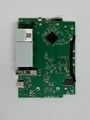 Board top
 -
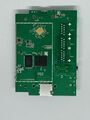 Board bottom
 -
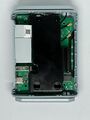 Internal view


See also
 | This article's use of red links may need cleanup. |
Models
- GL.iNet • Products • Compare • FCC ID - 2AFIW
Categories:
- GL.iNet
- Embedded system/travel router
- Embedded System MediaTek
- Embedded System MT7621A
- MediaTek
- Embedded System MIPS 1004Kc
- Embedded System
- Manuf SGT
- OpenWrt Supported
- Embedded System MT7615D
- Has Mimo Status
- Embedded System IEEE 802.11a/b/g/n/ac
- Single-Radio Wireless Embedded System
- Wireless Embedded System
- Dual-Band
- English Documentation


