Google Android Things Starter Kit
| abgn+ac (AC750) | |
|---|---|
| Android Things Starter Kit | |
 | |
| Homepage | Product page |
| WikiDevi.wi-cat.ru | Google Android Things Starter Kit |
| 3rd Party Firmware | |
| dd-wrt | Status Unknown |
| OpenWrt | Supported |
| Tomato any flavor | Incompatible |
| Gargoyle | Status Unknown |
| Platform | |
| Brand • Model • Rev | Google Android ThingsStarter Kit (i.MX7D) |
| FCC ID | none specified |
| Type | development board |
CPU1  | Freescale (NXP) i.MX7D |
| CPU1 Type | ARM Cortex-A7 |
| CPU1 Type2 | ARM Cortex-M4 |
| CPU1 Speed | 1.0 GHz ( 1 cores ) |
| CPU1 Speed2 | 200 MHz ( 1 cores ) |
| Flash1 Chip | Kingston EMMC04G-M627 |
| Flash1 Size | 4 GiB 4,096 MiB <br />4,294,967,296 B <br />33,554,432 Kib <br />4,194,304 KiB <br />32,768 Mib <br /> (eMMC) |
| RAM1 Size | 512 MiB 536,870,912 B <br />4,194,304 Kib <br />524,288 KiB <br />4,096 Mib <br />0.5 GiB <br /> (DDR3L SDRAM) |
| RAM1 Chip | SK hynix H5TC2G63GFR-PBA x 2 |
| ETH chip1 | Freescale (NXP) i.MX7D |
| ETH chip2 | Atheros AR8035-A |
| Ethernet Port Count | 1-1GbE-LAN |
| Wired Standard | IEEE 802.3i/3u/3ab |
| Stock bootloader | U-Boot 2015.04 |
| Stock FW OS | Linux 4.1.33 Android Things |
| Expansion IF types | USB 2.0, MikroBus |
| USB ports | 1 |
| USB Hub Compatible | Untested |
| Power | 5 VDC, 3 A |
| Connector type | USB 3.0 (Type C) |
| Serial Port (UART) | yes, console port, USB Female (Micro-B), 3.3V TTL, (115200 8N1) |
|
Flags: | |
|
Additional chips | |
| Other | |
|
| |
| Manuf/OEM/ODM | TechNexion |
| 3rd Party Firmware Support |
OpenWrt • (List | Dev | DLs) |
| Retail | |
| (Est.) release date | March 2018 |
| (Est.) initial retail price (in USD): | $200 |
| UPC |
842776105363 (UPC DB, On eBay) |
| Radio 1 | |
| Radio1 module | AMPAK AP6335 |
| Radio1 module IF | SDIO 3.0 |
| Chip1 | Broadcom BCM4339 |
| Wireless interface OUI | 00:1F:7B |
| Antenna Connector Type | U.FL |
| MIMO status | 1x1:1 |
| Wireless Standard | IEEE 802.11a/b/g/n/ac |
| 802.11ac | up to 433 Mbps |
| 802.11n | up to 150 Mbps |
| 802.11g | up to 54 Mbps |
| 802.11b | up to 11 Mbps |
| 802.11a | up to 54 Mbps |
| WiFi Operating Frequency | 2.4 or 5 GHz |
For a list of all currently documented Atheros (QCA) chipsets with specifications, see Atheros.
For a list of all currently documented Broadcom chipsets with specifications, see Broadcom.
For a list of all currently documented Freescale (NXP) SoC's with specifications, see Freescale.
For a list of all currently documented Google devices with specifications, see Google.
Overview
The kit includes:
- • NXP i.MX7D Pico Development board
- • Pimoroni Rainbow Hat
- • 5MP Camera Module
- • 5" Multi-touch Display
- • Wi-Fi antenna
- • Supporting cables
Hardware specification
- CPU: Freescale (NXP) i.MX7D (MCIMX7D7DVM10SC) ARM
- @800MHz Dual Core (Cortex-A7)/@200MHz (Cortex-M4)
- Memory: 512MB SDRAM (DDR3L)
- Onboard Storage: 4GB (eMMC)
- Wi-Fi: 802.11abgn/ac 1T1R
- Network: 1x Gigabit Ethernet
- USB: 1x USB 2.0 port
- Power Source: 5V USB (Type-C)
Links of Interest
Flashing
 | NOTE: During configuration or flashing a device, the only things that should be hooked to the device is the computer and power. |
Flashing OpenWrt
 | Devices with Broadcom WiFi chipsets have limited OpenWrt supportability (due to limited FLOSS driver availability for Broadcom chips). Consider this when choosing a device to buy, or when deciding to flash OpenWrt on your device because it is listed as supported. See Broadcom WiFi for details. |
Subtarget: cortexa7
Package architecture: arm_cortex-a7_neon-vfpv4
Supported Since Commit
Support started version: 23.05.0
Current supported version: 24.10.6
WLAN Comment: 1x1:1 MIMO
Installation method(s):
see git-commit
Recovery method(s):
see git-commit
| git • >> |
|---|
imx: cortexa7: add support for TechNexion PICO-PI-IMX7D
TechNexion PICO-PI-IMX7D is a NXP i.MX 7Dual based development board in
the well-known "Raspberry Pi" form factor, comprising of PICO-IMX7 SoM
and the PICO-PI-IMX7D carrier board.

Usually bundled with a 5" 800x480 LVDS display with I2C touchscreen and
an Omnivision OV5645 camera on a MIPI CSI bus, on a daughterboard. The
board was previously used primarily with "Android Things" ecosystem, but
the project was killed by Google.

This would not be possible, if not for the great tutorial of setting up
Debian on this board, by Robert C. Nelson [1].

Hardware highlights:

  CPU: NXP i.MX 7Dual SoC, dual-core Cortex-A7 at 1000 MHz
  RAM: 512 MiB DDR3 SDRAM
  Storage: 4 GB eMMC
  Networking:
    - built-in Gigabit Ethernet with Atheros AR8035 PHY,
    - Broadcom BCM4339 1x1 802.11ac Wi-Fi (over SDIO) + Bluetooth 4.1
      (over SDIO + UART + IS2) combo, with Hirose u.FL connector on the
      board,
    - dual CAN interfaces on the 40-pin connector,
  Interfaces:
    - USB-C power input plus USB 2.0 OTG host/device port,
    - single USB-A host port,
    - serial console over built-in FT232BL USB-UART converter with
      micro-USB connector (configuration: 115200-8-N-1),
    - analog audio interface with TRRS connector in CTIA standard,
    - SPI, I2C and UART interfaces available on the 40-pin,
    - mikroBUS connector,
    - I2C connector for the optional touch panel,
    - parallel LCD output for the optional display,
    - MIPI CSI connector for the optional camera

Installation:

1. Connect the serial console to debug USB connector and the terminal of
   choice in another window, at 115200-8-N-1. Ensure you can switch to
   it quickly after next step.

2. Power-on the board from your PC. Ensure your PC can supply required
   current, the board can take more than 1 A in the peak load during
   booting and brownout will result in power-on reset loop. Preferably,
   use charging-capable USB port or connect through self-powered USB
   hub. If U-Boot is present already on the eMMC, interrupt the booting
   sequence by pressing any key and skip to point 7.

3. Ensure the boot mode jumpers J1 and J2 are in correct position for
   USB recovery:

       2   6  2   6
      --------------
      |o o-o||o-o o|
      |o o-o||o-o o|
   J1 -------------- J2
       1   5  1   5

   The jumpers are located just underneath the 40-pin expansion header
   and are of the smaller 2 mm pitch.

4. Download and build 'imx_usb_loader' from:
   https://github.com/boundarydevices/imx_usb_loader.

5. Power-on the board again from your PC through USB OTG connector.

6. Use 'imx_usb_loader' to load 'SPL' and 'u-boot-dtb.img' to the board:

   $ sudo imx_usb u-boot-pico-pi-imx7d/SPL
   $ sudo imx_usb u-boot-pico-pi-imx7d/u-boot-dtb.img

7. Switch to the terminal from step 2 and interrupt boot sequence by
   pressing any key within 2 seconds.

8. Configure mmc 0 to boot from the data partition and disable access to
   boot partitions:

   => mmc partconf 0 0 7 0

   This only needs to be set once. If you were running Debian previously,
   this is probably already set.

9. Enable USB mass storage passthrough for eMMC from U-boot

   => ums 0 mmc 0

10. Optionally, backup previous eMMC contents by reading out its image.

11. Copy over the factory image to the USB device, for example:

    $ sudo dd if=openwrt-imx-cortexa7-pico-pi-imx7d-squashfs.combined.bin \
      of=/dev/disk/by-id/usb-Linux_UMS_disk_0-0:0 \
      bs=8M status=progress oflag=direct

12. Detach USB MSC interface from your PC and U-Boot by pressing Ctrl+C.

13. Ensure that boot mode jumpers are at the default settings for eMMC
    boot:

       2   6  2   6
      --------------
      |o-o o||o o-o|
      |o-o o||o-o o|
   J1 -------------- J2
       1   5  1   5

   If they are not, power-off the board, restore them and power-on the
   board again. Otherwise, if jumpers are set, just reset the board from
   U-Boot CLI:

   => reset

14. The installation is now complete and board should boot successfully.

Upgrading: just use sysupgrade image, as usual in OpenWrt.

Known issues/current limitations:

- OV5645 camera - not described in upstream device tree as of kernel
  5.15. There are staging drivers present in upstream Linux tree for
  i.MX 7 CSI, MIPI-CSI and video mux, and the configuration is there in
  imx7s.dtsi - so this is expected to get supported eventually,
- on-chip ADCs are disabled in upstream device tree, so the kernel
  driver remains disabled as well.

[1] https://forum.digikey.com/t/debian-getting-started-with-the-pico-pi-imx7/12429

Signed-off-by: Lech Perczak
[pepe2k@gmail.com: commit description reworded]
Signed-off-by: Piotr Dymacz
|
Pictures
-
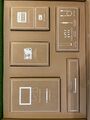 Contents
 -
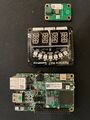 Top of boards
 -
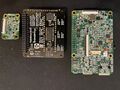 Bottom of boards


- Embedded system/development board
- Embedded System Freescale (NXP)
- Embedded System i.MX7D
- Freescale (NXP)
- Embedded System ARM
- Embedded System Cortex-A7
- Embedded System Cortex-M4
- Embedded System AR8035-A
- Embedded System Atheros
- Atheros
- Manuf TechNexion
- OpenWrt Supported
- Embedded System Broadcom
- Embedded System BCM4339
- Broadcom
- Has Mimo Status
- Embedded System IEEE 802.11a/b/g/n/ac
- Single-Radio Wireless Embedded System
- Wireless Embedded System
- Dual-Band
- Embedded System
- English Documentation


