Turris Omnia
| abgn+ac (AC1750) | |
|---|---|
| Open-source SOHO Network Router | |
 | |
| WikiDevi.wi-cat.ru | Turris Omnia |
| 3rd Party Firmware | |
| dd-wrt | Status Unknown |
| OpenWrt | Partial Support |
| Tomato any flavor | Incompatible |
| Gargoyle | Status Unknown |
| Platform | |
| Brand • Model • Rev | CZ.NIC Turris Omnia |
| Model Part Number | RTROM01-1G |
| FCC ID | none specified |
| Type | wireless router |
CPU1  | Marvell 88F6820 |
| CPU1 Type | ARMv7 Cortex-A9 |
| CPU1 Speed | 1.6 GHz ( 2 cores ) |
| Flash1 Chip | SK hynix Model? |
| Flash1 Size | 8 GiB 8,192 MiB <br />8,589,934,592 B <br />67,108,864 Kib <br />8,388,608 KiB <br />65,536 Mib <br /> (eMMC) |
| RAM1 Size | 1 GiB 1,024 MiB <br />1,073,741,824 B <br />8,388,608 Kib <br />1,048,576 KiB <br />8,192 Mib <br /> |
| RAM1 Chip | SK hynix H5TC4G63CFR-PBA x 2 |
| ETH chip1 | Marvell 88F6820 |
| Switch | Marvell 88E6176 |
| Ethernet Port Count |
1-1GbE-WAN 5-1GbE-LAN |
| Wired Standard | IEEE 802.3i/3u/3ab |
| Stock bootloader | U-Boot |
| Stock FW OS | Linux OpenWrt-deriv |
| Expansion IF types | Mini PCIe, USB 3.0, mSATA, SFP, SIM Card slot |
| SIM Card slot | 1 |
| Mini PCIe slots | 3 |
| USB ports | 2 |
| SATA Ports | 1 |
| SFP ports | 1 |
| USB Hub Compatible | Untested |
| Power | 12 VDC, 3.33 A |
| Connector type | barrel |
| Serial Port (UART) | yes, 4-pin header, populated, 3.3V TTL, (115200 8N1) |
| JTAG Port | yes, populated, 20-pin header |
|
Flags: | |
|
| |
| Other | |
|
Default SSID: Turris (3 addl. devices) | |
| 3rd Party Firmware Support |
OpenWrt • (List | Dev | DLs) |
| Retail | |
| ASINs |
B01MG47OY3  B01M7TNEP3  |
| Radio 1 | |
| Radio1 module | Compex WLE200N2 |
| Radio1 module IF | Mini PCIe (half) |
| Chip1 | Atheros AR9287 |
| Wireless interface OUI | 04:F0:21 |
| Antenna Connector Type | U.FL, RP-SMA |
| MIMO status | 2x2:2 |
| Wireless Standard | IEEE 802.11b/g/n |
| 802.11n | up to 300 Mbps |
| 802.11g | up to 54 Mbps |
| 802.11b | up to 11 Mbps |
| WiFi Operating Frequency | 2.4 GHz |
| Radio 2 | |
| Radio2 module | Compex WLE900VX |
| Radio2 module IF | Mini PCIe |
| Chip1 | Qualcomm Atheros QCA9880 v2 |
| Wireless interface OUI | 04:F0:21 |
| Antenna Connector Type | none specified |
| MIMO status | 3x3:3 |
| Wireless Standard | IEEE 802.11a/n/ac |
| 802.11ac | up to 1300 Mbps |
| 802.11n | up to 450 Mbps |
| 802.11a | up to 54 Mbps |
| WiFi Operating Frequency | 5 GHz |
For a list of all currently documented Atheros (QCA) chipsets with specifications, see Atheros.
For a list of all currently documented Marvell chipsets with specifications, see Marvell.
For a list of all currently documented Qualcomm Atheros (QCA) chipsets with specifications, see Qualcomm Atheros.
For a list of all currently documented CZ.NIC devices with specifications, see CZ.NIC.
Overview
Product page (EN) • Documentation • Schematics
Specifications, per their product page...
- There are two variants of the Omnia - one with 1GiB and another with 2GiB RAM
- 3x MiniPCIe (1x MiniPCIe/mSATA)
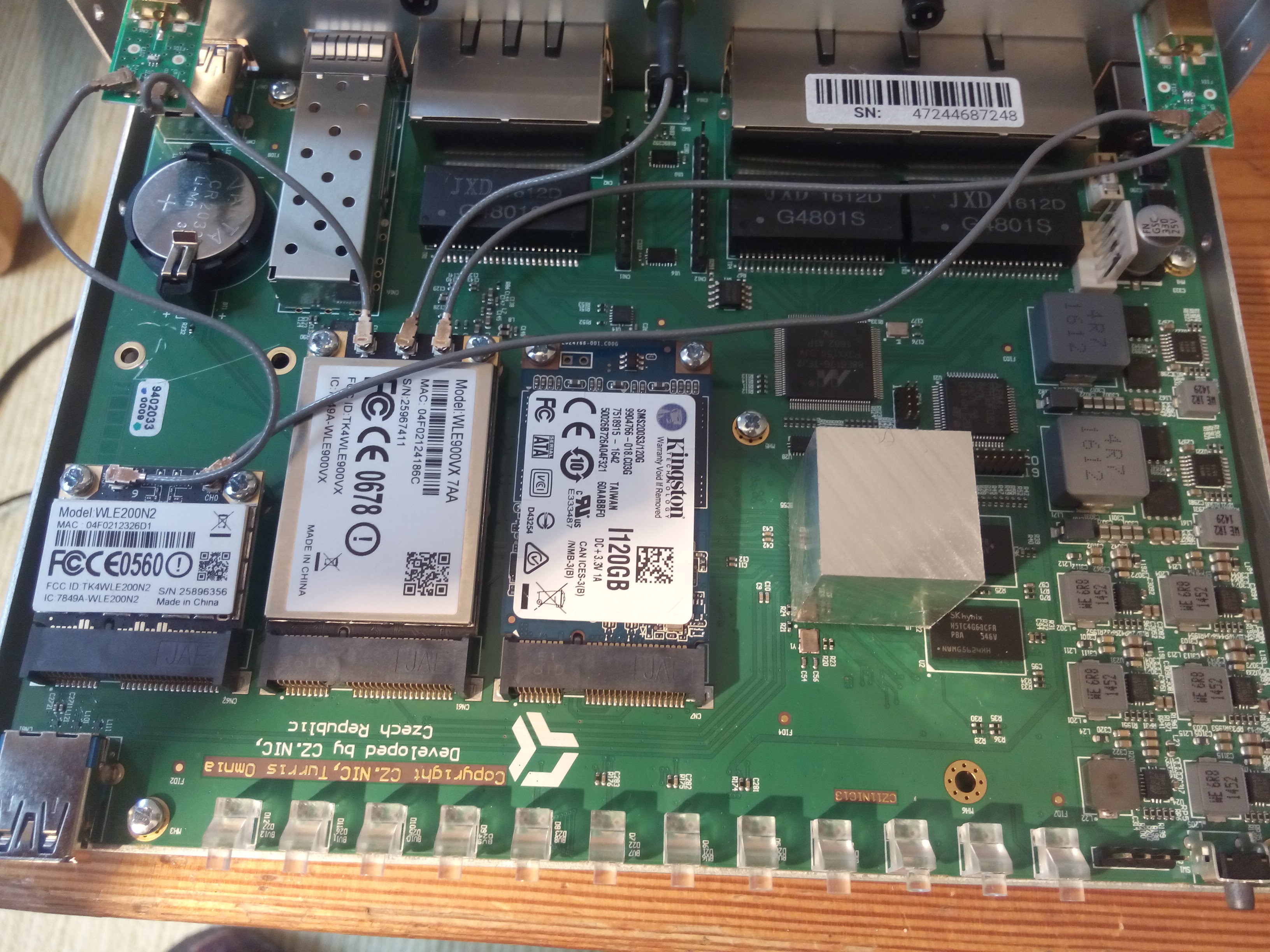
Wireless modules used are per the below image, the one shown on Wikipedia.
Links of Interest
- ARMADA 385 SoC (88F6820)
- Power specifications are per LEDE's HWDATA
- RAM: SK hynix H5TC4G63CFR or Micron MT41K256M16HA
Flashing
 | NOTE: During configuration or flashing a device, the only things that should be hooked to the device is the computer and power. |
Flashing OpenWrt
Subtarget: cortexa9
Package architecture: arm_cortex-a9_vfpv3-d16
Supported Since Commit
Support started version: 18.06.0
Current supported version: 25.12.5
RGB LED, secondary CPU uplink to switch
LAN Hardware: Marvell 88E6176
LAN Comment: 5x LAN
WLAN Hardware: Qualcomm Atheros QCA988x (miniPCIe), Atheros AR9287 (miniPCIe)
WLAN Comment: 2x2 802.11b/g/n (2.4GHz), 3x3 802.11ac (2.4 / 5GHz)
Installation method(s):
see devicepage
Recovery method(s):
see devicepage
Recovery Comment:
flash drive formatted with FAT32 / ext2/3/4 / btrfs / XFS, image has to be named: omnia-medkit*.tar.gz for reset mode 4 recovery
Comment:
Turris OS 3.x uses an operating system based on OpenWrt, see https://github.com/CZ-NIC/turris-os; Turris OS 4.x is based on top of OpenWrt, see https://gitlab.labs.nic.cz/turris/turris-build; 1024MB RAM version was also available
| git • >> |
|---|
mvebu: add support for Turris Omnia Adds support for the Turris Omnia and builds an eMMC sysupgrade image in the same format as the SolidRun ClearFog. An initramfs image in the simple yet Omnia-specific 'medkit' image format is also built in order to ease the initial flashing process. Notable hardware support omissions are support for switching between SFP cage and copper PHY, and RGB LED control. Due to a current limitation of DSA, only 1/2 CPU switch uplinks are used. Specifications: - Marvell Armada 385 1.6GHz dual-core ARMv7 CPU - 1GB DDR3 RAM - 8GB eMMC Flash - 5x Gigabit LAN via Marvell 88E6176 Switch (2x RGMII CPU ports) - 1x switchable RJ45 (88E1514 PHY) / SFP SGMII WAN - 2x USB 3.0 - 12x dimmable RGB LEDs controlled by independent MCU - 3x Mini PCIe slots - Optional Compex WLE200N2 Mini PCIe AR9287 2x2 802.11b/g/n (2.4GHz) - Optional Compex WLE900VX Mini PCIe QCA9880 3x3 802.11ac (2.4 / 5GHz) - Optional Quectel EC20 Mini PCIe LTE modem Flash instructions: If the U-Boot environment has been modified previously (likely manually via serial console), first use serial to reset the default environment. => env default -a => saveenv Method 1 - USB 'medkit' image w/o serial - Copy openwrt-mvebu-turris-omnia-sysupgrade.img.gz and omnia-medkit-openwrt-mvebu-turris-omnia-initramfs.tar.gz to the root of a USB flash drive formatted with FAT32 / ext2/3/4 / btrfs / XFS. Note that the medkit MUST be named omnia-medkit*.tar.gz - Disconnect other USB devices from the Omnia and connect the flash drive to either USB port. - Power on the Omnia and hold down the rear reset button until 4 LEDs are illuminated, then release. - Wait approximately 2 minutes for the Turris Omnia to flash itself with the temporary image, during which LEDs will change multiple times. - Connect a computer to a LAN port of the Turris Omnia with a DHCP client - (if necessary) ssh-keygen -R 192.168.1.1 - ssh root@192.168.1.1 $ mount /dev/sda1 /mnt $ sysupgrade /mnt/openwrt-mvebu-turris-omnia-sysupgrade.img.gz - Wait another minute for the final OpenWrt image to be flashed. The Turris Omnia will reboot itself and you can remove the flash drive. Method 2 - TFTP w/ serial - Extract omnia-medkit-openwrt-mvebu-turris-omnia-initramfs.tar.gz and copy dtb + zImage to your TFTP server (rename if desired) - Connect Turris Omnia WAN port to DHCP-enabled network with TFTP server - Connect serial console and interrupt U-Boot => dhcp => setenv serverip <tftp_server_ip_here> => tftpboot 0x01000000 zImage => tftpboot 0x02000000 dtb => bootz 0x01000000 - 0x02000000 - OpenWrt will now boot from ramdisk - Download openwrt-mvebu-turris-omnia-sysupgrade.img.gz to /tmp/ $ sysupgrade /tmp/openwrt-mvebu-turris-omnia-sysupgrade.img.gz - Wait another minute for the final OpenWrt image to be flashed. The Turris Omnia will reboot itself. |
Pictures
Wikipedia images (from Lklundin, CC-BY-SA 4.0)

Notes
Wireless module compatibility
Some wireless modules, do not currently seem to play nice with the Omnia - they are simply not detected at all.
Tested as non-recognized (possibly non-working)
- Atheros AR5BXB6 (AR5424 [abg]) ref. design
- Atheros AR5BHB63 (AR2425 [bg]) ref. design
- unknown module, IBM FRU 43Y6511
- Atheros AR5B91 (AR9281 [bgn, 1x2], half+full) ref. design
- Atheros AR5BXB92 (AR9280 [abgn, 2x2], full-size) ref. design
- Intel PRO/Wireless 3945ABG
- Intel Wireless WiFi Link 4965AGN
Tested as recognized (possibly working)
- Atheros AR5B95 (AR9285 [bgn, 1x1]) ref. design
- Atheros AR5B97 (AR9287 [bgn, 2x2]) ref. design
- Compex WLE200N2, literally included with the unit
- Atheros AR5B22 (AR9462 [abgn, 2x2]) ref. design
- Atheros AR5BHB116 (AR9382 [abgn, 2x2]) ref. design
- MikroTik R11e-2HnD (AR9582 [bgn, 2x2])
- MikroTik R11e-5HnD (AR9582 [an, 2x2])
- Compex WLE900VX (QCA9880v2 [abgn+ac, 3x3]), literally included with the unit
- Intel WiFi Link 5100 (abgn, full size)
- Intel WiFi Link 5300 (full size)
- Intel Centrino Advanced-N 6200 (622ANHMW)
- Intel Centrino Ultimate-N 6300
- Lite-On WCBN607RH-H1 (HP) (RT3592, [abgn, 2x2])
- CZ.NIC
- Embedded system/wireless router
- Embedded System Marvell
- Embedded System 88F6820
- Marvell
- Embedded System ARMv7
- Embedded System Cortex-A9
- Embedded System 88E6176
- OpenWrt Supported
- Embedded System Atheros
- Embedded System AR9287
- Atheros
- Has Mimo Status
- Embedded System IEEE 802.11b/g/n
- Embedded System Qualcomm Atheros
- Embedded System QCA9880 v2
- Qualcomm Atheros
- Embedded System IEEE 802.11a/n/ac
- Dual-Radio Wireless Embedded System
- Wireless Embedded System
- Dual-Band
- Embedded System
- English Documentation