Netgear R6400 v1
From TechInfoDepot
(Redirected from NETGEAR R6400 v1)
| abgn+ac (AC1750) | |||||||||||||||||
|---|---|---|---|---|---|---|---|---|---|---|---|---|---|---|---|---|---|
| AC1750 Smart WiFi Router | |||||||||||||||||
 | |||||||||||||||||
| Homepage | Product page | ||||||||||||||||
| Support | Support page | ||||||||||||||||
| Wikipedia | Netgear | ||||||||||||||||
| WikiDevi.wi-cat.ru | Netgear R6400 v1 | ||||||||||||||||
| 3rd Party Firmware | |||||||||||||||||
| dd-wrt | Supported | ||||||||||||||||
| OpenWrt | Partial Support | ||||||||||||||||
| Tomato any flavor | Supported | ||||||||||||||||
| Gargoyle | Status Unknown | ||||||||||||||||
| Platform | |||||||||||||||||
| Brand • Model • Rev | Netgear R6400-100NAS v1 | ||||||||||||||||
| FCC ID | PY315100300 | ||||||||||||||||
| Board ID | U12H332T00_NETGEAR | ||||||||||||||||
| Type | wireless router | ||||||||||||||||
CPU1  | Broadcom BCM4708A0 | ||||||||||||||||
| CPU1 Type | ARM Cortex-A9 | ||||||||||||||||
| CPU1 Speed | 800 MHz ( 2 cores ) | ||||||||||||||||
| Flash1 Chip | Macronix MX30LF1G08AA-TI | ||||||||||||||||
| Flash1 Size | 128 MiB 134,217,728 B <br />1,048,576 Kib <br />131,072 KiB <br />1,024 Mib <br />0.125 GiB <br /> (NAND) | ||||||||||||||||
| RAM1 Size | 256 MiB 268,435,456 B <br />2,097,152 Kib <br />262,144 KiB <br />2,048 Mib <br />0.25 GiB <br /> | ||||||||||||||||
| RAM1 Chip | Samsung K4B2G1646Q-BCK0 | ||||||||||||||||
| ETH chip1 | Broadcom BCM4708A0 | ||||||||||||||||
| Switch | Broadcom BCM4708A0 | ||||||||||||||||
| Ethernet Port Count |
1-1GbE-WAN 4-1GbE-LAN | ||||||||||||||||
| Wired Standard | IEEE 802.3i/3u/3ab | ||||||||||||||||
| Stock bootloader | CFE | ||||||||||||||||
| Expansion IF types | USB 3.0, USB 2.0 | ||||||||||||||||
| USB ports | 2 | ||||||||||||||||
| USB Hub Compatible | Untested | ||||||||||||||||
| Power | 12 VDC, 2.5 A | ||||||||||||||||
| Connector type | barrel | ||||||||||||||||
| Serial Port (UART) | yes, 4-pin header, J252, 3.3, 115200 / 8N1 | ||||||||||||||||
|
| |||||||||||||||||
|
Additional chips | |||||||||||||||||
| Other | |||||||||||||||||
|
Default IP address: 192.168.1.1 | |||||||||||||||||
| Manuf/OEM/ODM | Foxconn U12H332 T00 | ||||||||||||||||
| 3rd Party Firmware Support |
DD-WRT • (List) , FreshTomato • (List | DLs) , OpenWrt • (List | Dev | DLs) | ||||||||||||||||
| Retail | |||||||||||||||||
| Availability | End of Life | ||||||||||||||||
| FCC approval date | 05 May 2015 | ||||||||||||||||
| ASIN |
B00Z0V2NQ8  | ||||||||||||||||
| Country of manuf | China, Vietnam | ||||||||||||||||
| Radio 1 | |||||||||||||||||
| Chip1 | Broadcom BCM4331 | ||||||||||||||||
| Wireless interface OUI | 44:94:FC | ||||||||||||||||
| Antenna Connector Type | U.FL | ||||||||||||||||
| MIMO status | 3x3:3 | ||||||||||||||||
| Wireless Standard | IEEE 802.11b/g/n | ||||||||||||||||
| 802.11n | up to 450 Mbps | ||||||||||||||||
| 802.11g | up to 54 Mbps | ||||||||||||||||
| 802.11b | up to 11 Mbps | ||||||||||||||||
| WiFi Operating Frequency | 2.4 GHz | ||||||||||||||||
| Radio cor_rev | 29 | ||||||||||||||||
| Radio 2 | |||||||||||||||||
| Chip1 | Broadcom BCM4360 | ||||||||||||||||
| Wireless interface OUI | 44:94:FC | ||||||||||||||||
| Antenna Connector Type | U.FL | ||||||||||||||||
| MIMO status | 3x3:3 | ||||||||||||||||
| Wireless Standard | IEEE 802.11a/n/ac | ||||||||||||||||
| 802.11ac | up to 1300 Mbps | ||||||||||||||||
| 802.11n | up to 450 Mbps | ||||||||||||||||
| 802.11a | up to 54 Mbps | ||||||||||||||||
| WiFi Operating Frequency | 5 GHz | ||||||||||||||||
| Radio cor_rev | 40 | ||||||||||||||||
| |||||||||||||||||
| |||||||||||||||||
For a list of all currently documented Broadcom chipsets with specifications, see Broadcom.
For a list of all currently documented Netgear devices with specifications, see Netgear.
Overview
- OEM: Foxconn (Ambit) U12H332T00
Links of Interest
Reviews
-
- - SiGE SE2604L 2.4GHz Power Amplifier (x3)
- - Skyworks SKY13377 6GHz SPDT switch (x3)
- - Skyworks SKY65405-21 2.4GHz LNA (x3)
- 5GHz radio - Broadcom BCM4360
- - Skyworks SE5003L1 5GHz 23dBm Power Amplifier (x3)
- - Skyworks SKY13370 6GHz SPDT switch (x3)
- - Skyworks Unidentified 5GHz LNA (x3)
Flashing
 | NOTE: During configuration or flashing a device, the only things that should be hooked to the device is the computer and power. |
 | ***Warning*** DO NOT PERFORM A 30/30/30 VIA RESET BUTTON! |
Flashing dd-wrt
On the DDWRT Wiki
Support started version: unknown
Current supported version: unknown
Comment:
This is ONLY for the Netgear R6400 (v1). It is not for R6400v2 / R6400v2OTP / R6700v3.
Support started version: unknown
Current supported version: unknown
Comment:
This is ONLY for the Netgear R6400 (v1). It is not for R6400v2 / R6400v2OTP / R6700v3.
Please insert instructions here
Flashing OpenWrt
| The development branch can contain experimental code that is under active development and should not be used for production environments. Snapshot images may support additional hardware; however, it is experimental, considered unstable, and sometimes won't compile. |
| Prebuilt snapshot images do not come with any web interface or GUI. You will need to be comfortable using a command line and remote shell to install one yourself → How to install LuCI |
| Devices with Broadcom WiFi chipsets have limited OpenWrt supportability (due to limited FLOSS driver availability for Broadcom chips). Consider this when choosing a device to buy, or when deciding to flash OpenWrt on your device because it is listed as supported. See Broadcom WiFi for details. |
Target: bcm53xx
Subtarget: generic
Package architecture: arm_cortex-a9
Supported Since Commit
Support started version: unknown
Current supported version: snapshot
Subtarget: generic
Package architecture: arm_cortex-a9
Supported Since Commit
Support started version: unknown
Current supported version: snapshot
Unsupported Functions:
WiFi 5GHz, WiFi 2.4GHz partly (802.11g only)
LAN Hardware: Broadcom BCM53011 (SoC integrated)
WLAN Hardware: Broadcom BCM4331, Broadcom BCM4360
WLAN Comment: 3x3, AC1750
Installation method(s):
GUI OEM
Install Comment:
Board ID U12H332T00_NETGEAR
Recovery method(s):
see devicepage
Recovery Comment:
nmrpflash with a stock or OpenWrt .chk
Comment:
Serial header J252 (V G T R)
WiFi 5GHz, WiFi 2.4GHz partly (802.11g only)
LAN Hardware: Broadcom BCM53011 (SoC integrated)
WLAN Hardware: Broadcom BCM4331, Broadcom BCM4360
WLAN Comment: 3x3, AC1750
Installation method(s):
GUI OEM
Install Comment:
Board ID U12H332T00_NETGEAR
Recovery method(s):
see devicepage
Recovery Comment:
nmrpflash with a stock or OpenWrt .chk
Comment:
Serial header J252 (V G T R)
| git • >> |
|---|
bcm53xx: add support for Netgear R6400 v1 Hardware: - SoC: Broadcom BCM4708A0, 2x Cortex-A9 at 800 MHz - RAM: 256 MiB - Flash: 128 MiB NAND (BCH-8) - Ethernet: 4x LAN + 1x WAN, gigabit (switch port 0 = WAN, 1-4 = LAN) - Wi-Fi: BCM4331 2.4 GHz (b43), BCM4360 5 GHz - USB: 1x USB 3.0, 1x USB 2.0 - LEDs: power (white/amber), WAN (white/amber), 2.4 GHz, 5 GHz, WPS, WiFi, USB 1, USB 2 - Buttons: WPS, WiFi (rfkill), Reset - Serial: 115200 8N1 on the SoC UART (ttyS0); the on-board header was not used for this port, netconsole served as the console - Power: 12 V DC, 2.5 A (barrel jack, included adapter) - Board ID: U12H332T00_NETGEAR MAC addresses (NVRAM): - LAN: et0macaddr - WAN: et1macaddr - 2.4 GHz: pci/1/1/macaddr - 5 GHz: pci/2/1/macaddr The LED and button GPIOs were mapped by driving each line by hand on a unit (egc112, GitHub review of the pull request). All LEDs are active low except the WPS and WiFi button LEDs, which are active high as on the R7000. The LEDs use the color/function bindings (white:power, amber:power, white:wan, amber:wan, white:wlan-2ghz, white:wlan-5ghz, white:wps, white:wlan, white:usb-1, white:usb-2); diag.sh, with the preceding commit, picks white:power as the status LED, so boot goes amber (bootloader), blinking white (preinit), solid white. egc112 re-tested the LEDs, buttons, board check and USB on a v1 and a v2. The 2.4 GHz LED is driven as a netdev trigger on phy0-ap0: b43 has no phy0tpt trigger and the phy0radio/assoc/tx/rx ones stay dark in AP mode. sysupgrade accepts only a CHK image with this board ID. The USB VBUS regulator is left off at registration, as on the sibling boards, so VBUS is power-cycled after CFE. Not yet supported: 5 GHz Wi-Fi (the BCM4360 AC-PHY needs the b43 AC-PHY series, a separate pull request). Installation from stock firmware: 1. Connect a computer to a LAN port and open http://192.168.1.1 (factory login admin / password). 2. ADVANCED > Administration > Router Update, select the factory image (openwrt-bcm53xx-generic-netgear_r6400-v1-squashfs.chk), Upload. 3. Wait for the router to restart into OpenWrt. Recovery: Netgear's bootloader accepts a firmware image over TFTP/NMRP (e.g. nmrpflash) when the image does not boot. Signed-off-by: Russell Ballestrini Link: https://github.com/openwrt/openwrt/pull/25786 Signed-off-by: Jonas Jelonek |
Flashing Tomato
Please insert instructions here
Pictures
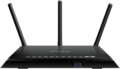
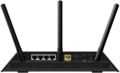
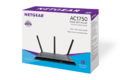
- from NETGEAR
-
-
-


Categories:
- Netgear
- Embedded system/wireless router
- Embedded System Broadcom
- Embedded System BCM4708A0
- Broadcom
- Embedded System ARM
- Embedded System Cortex-A9
- Manuf Foxconn
- DD-WRT Supported
- Tomato Supported
- OpenWrt Supported
- Embedded System BCM4331
- Has Mimo Status
- Embedded System IEEE 802.11b/g/n
- Embedded System BCM4360
- Embedded System IEEE 802.11a/n/ac
- Dual-Radio Wireless Embedded System
- Wireless Embedded System
- Dual-Band
- Embedded System
- English Documentation


