Synology DiskStation DS213j
| 2-Bay (Diskless) Network Attached Storage | |||||||||||||
 | |||||||||||||
| Support | Support page | ||||||||||||
|---|---|---|---|---|---|---|---|---|---|---|---|---|---|
| 3rd Party Firmware | |||||||||||||
| dd-wrt | Status Unknown | ||||||||||||
| OpenWrt | Supported | ||||||||||||
| Tomato any flavor | Incompatible | ||||||||||||
| Gargoyle | Status Unknown | ||||||||||||
| Platform | |||||||||||||
| Brand • Model • Rev | Synology DiskStation DS213j | ||||||||||||
| Model Part Number | DDM21L1 | ||||||||||||
| Board ID | 08-04DDM2115 | ||||||||||||
| Type | NAS | ||||||||||||
CPU1  | Marvell 88F6707 | ||||||||||||
| CPU1 Type | ARMv7 (PJ4 core) | ||||||||||||
| CPU1 Speed | 1.2 GHz | ||||||||||||
CPU2  | Texas Instruments MSP430F2111 | ||||||||||||
| CPU2 Speed | 16 MHz | ||||||||||||
| Flash1 Chip | Micron N25Q064 | ||||||||||||
| Flash1 Size | 8 MiB 8,388,608 B <br />65,536 Kib <br />8,192 KiB <br />64 Mib <br />0.00781 GiB <br /> (SPI NOR) | ||||||||||||
| Flash2 Chip | Texas Instruments MSP430F2111 | ||||||||||||
| Flash2 Size | 2 KiB 0.00195 MiB <br />2,048 B <br />16 Kib <br />0.0156 Mib <br />1.907349e-6 GiB <br /> | ||||||||||||
| RAM1 Size | 512 MiB 536,870,912 B <br />4,194,304 Kib <br />524,288 KiB <br />4,096 Mib <br />0.5 GiB <br /> (DDR3 SDRAM) | ||||||||||||
| RAM1 Chip | SK hynix H5TQ2G83CFR-PBC x 2 | ||||||||||||
| RAM2 Size | 128 B 1.220703e-4 MiB <br />1 Kib <br />0.125 KiB <br />9.765625e-4 Mib <br />1.192093e-7 GiB <br /> | ||||||||||||
| RAM2 Chip | Texas Instruments MSP430F2111 | ||||||||||||
| ETH chip1 | Marvell 88F6707 | ||||||||||||
| ETH chip2 | Marvell 88E1512 | ||||||||||||
| Ethernet Port Count | 1-1GbE-LAN | ||||||||||||
| Wired Standard | IEEE 802.3i/3u/3ab | ||||||||||||
| Stock bootloader | U-Boot 2011.12 Marvell v2011.12 2013 Q1.2 | ||||||||||||
| Stock FW OS | Linux 3.2.101 | ||||||||||||
| Expansion IF types | USB 2.0, SATA II (3.0Gbps) | ||||||||||||
| USB ports | 2 | ||||||||||||
| SATA Ports | 2 | ||||||||||||
| USB Hub Compatible | Untested | ||||||||||||
| Power | 12 VDC, 5 A | ||||||||||||
| Connector type |
barrel 5.5 mm (OD) 2.1 mm (ID) 9.5 mm (LEN) | ||||||||||||
| Serial Port (UART) | yes, 6-pin header, populated, 3.3V TTL, (115200 8N1), JP2 | ||||||||||||
| JTAG Port | no | ||||||||||||
|
Flags: | |||||||||||||
|
Additional chips | |||||||||||||
| Other | |||||||||||||
|
Default IP address: acquired via DHCP | |||||||||||||
| Manuf/OEM/ODM | Brand? DDM21L1 V1.5 | ||||||||||||
| 3rd Party Firmware Support |
OpenWrt • (List | Dev | DLs) | ||||||||||||
| Retail | |||||||||||||
| Availability | End of Life | ||||||||||||
| End of Life date | 2016 | ||||||||||||
| (Est.) release date | 07 May 2013 | ||||||||||||
| (Est.) initial retail price (in USD): | $200 | ||||||||||||
| Newegg | N82E16822108139 | ||||||||||||
| ASIN |
B00CRB9CK4  | ||||||||||||
| Country of manuf | Taiwan | ||||||||||||
| |||||||||||||
For a list of all currently documented Marvell chipsets with specifications, see Marvell.
For a list of all currently documented Texas Instruments (TI) chipsets with specifications, see Texas Instruments.
For a list of all currently documented Synology devices with specifications, see Synology.
Overview
It's a 2-bay NAS. This device has 2x USB 2.0 ports.
Hardware specification
- CPU: Marvell 88F6707 @1.2GHz
- SoC: (Armada 370)
- Memory: 512MB (DDR3) SDRAM
- Storage: 8MB (SPI NOR) Flash,
- 2x SATA 2.0 ports
- Network: 1x Gigabit Ethernet port
- USB: 2x USB 2.0 ports
- Power: 12V, 5A via barrel
Links of Interest
Reviews
- Synology DiskStation DS213j NAS Reviewed on Gear Diary (07/2013)
- Synology DiskStation DS213j Review on Expert Reviews (07/2013)
- Synology DS213J NAS Review on PCHardware
Flashing
 | NOTE: During configuration or flashing a device, the only things that should be hooked to the device is the computer and power. |
Flashing OpenWrt
 | This device is NOT RECOMMENDED for future use with OpenWrt due to low flash/ram.
DO NOT BUY DEVICES WITH 8MB FLASH / 64MB RAM if you intend to flash an up-to-date and secure OpenWrt version onto it! See 8/64 warning for details. This device does not have sufficient resources (flash and/or RAM) to provide secure and reliable operation. This means that you will not be able to install many packages, and that you might experience crashes due to OOM situations more or less often. See OpenWrt on 8/64 devices what you can do now. |
Subtarget: cortexa9
Package architecture: arm_cortex-a9_vfpv3-d16
Supported Since Commit
Support started version: 24.10.0
Current supported version: 25.12.2
WLAN Comment: No WLAN
Installation method(s):
see git-commit
Recovery method(s):
see git-commit
| git • >> |
|---|
mvebu: add support for Synology DS213j The Synology DS213j is a rather dated dual-bay SATA NAS based on on the Marvell Armada-370 SoC. It has long been supported in vanilla Linux, however, flash partitioning there didn't match with reality (ie. the bootloaders expectations) and nobody cared to wrap up OpenWrt support for the device. CPU: Marvell Armada-370 ARMv7 SoC @ 1200 MHz RAM: 512 MB DDR3 Flash: 8 MB (Micron Technology N25Q064) Network: 1x 1000M/100M/10M Ethernet (Marvell 88E1510) SATA: 2x 3.0Gbps USB: 2x USB 2.0 As OS options are becoming limited on that still quite useful hardware, patch the flash partitions to be able to get the most out of it when using OpenWrt. The vendor firmware loads kernel and initrd from fixed addresses in the flash, not making use of a modifyable environment stored in flash which is stored at a location right in the middle of the vendor's zImage partition (at 0x100000). Stock firmware flash layout: 0x000000 ~ 0x0c0000 : "RedBoot" (actually U-Boot) 0x0c0000 ~ 0x390000 : "zImage" 0x390000 ~ 0x7d0000 : "rd.gz" 0x7d0000 ~ 0x7e0000 : "vendor" (contains MAC address, serial no) 0x7e0000 ~ 0x7f0000 : "RedBoot Config" (unused? legacy left-over) 0x7f0000 ~ 0x800000 : "FIS directory" (unused? legacy left-over) OpenWrt flash layout: 0x000000 ~ 0x0c0000 : "u-boot" 0x0c0000 ~ 0x100000 : "gap" 0x100000 ~ 0x110000 : "u-boot-env" 0x110000 ~ 0x7d0000 : "kernel" 0x7d0000 ~ 0x7e0000 : "vendor" (contains MAC address, serial no) 0x7e0000 ~ 0x800000 : "gap2" "kernel", "gap" and "gap2" are concatenated using the mtd-concat virtual MTD driver, resulting in a partition "firmware" used by OpenWrt for kernel, rootfs and rootfs-overlay, 0x720000 (7296kiB) in total. Installation: 1. Connect to internal serial console port and Ethernet port, providing a TFTP server at a static IPv4 address, e.g. 192.168.1.254/24. 2. Interrupt bootloader using CTRL+C 3. Configure bootloader to load OpenWrt on future boot: setenv bootcmd "bootm f4110000" saveenv 4. Load and boot initramfs image via TFTP: setenv ipaddr 192.168.1.1 setenv serverip 192.168.1.254 tftpboot openwrt-mvebu-cortexa9-synology_ds213j-initramfs-kernel.bin bootm 5. Use sysupgrade to load final image. |
Pictures
-
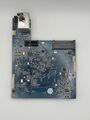 Main Board Top
 -
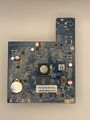 Main Board Bottom


See also
- Synology DiskStation DS210j • Marvell 88F6281 (@800MHz)
- Synology DiskStation DS211 • Marvell 88F6282 (@1.6GHz)
- Synology DiskStation DS211j • Marvell 88F6281 (@1.2GHz)
- Synology DiskStation DS211+ • Marvell 88F6282 (@1.6GHz)
- Synology DiskStation DS212 • Marvell 88F6282 (@1.6GHz)
- Synology DiskStation DS212j • Marvell 88F6281 (@1.2GHz)
- Synology DiskStation DS212+ • Marvell 88F6282 (@2.0GHz)
- Synology DiskStation DS213 • Marvell 88F6282 (@2.0GHz)
- Synology DiskStation DS213air • Marvell 88F6282 (@1.6GHz)
- Synology DiskStation DS213j • Marvell 88F6707 (@1.2GHz)
- Synology DiskStation DS213+ • Freescale P1022 (@1.0GHz)
- Synology DiskStation DS214 • Marvell MV78230 (2x @1.0GHz)
- Synology DiskStation DS214+ • Marvell MV78230 (2x @1.33GHz)
- Synology DiskStation DS214se • Marvell 88F6707 (@800MHz)
- Synology DiskStation DS214play • Intel Atom CE5335 (2x @1.6GHz)
- Synology DiskStation DS215+ • Annapurna Labs AL-212 (2x @1.4GHz)
- Synology DiskStation DS215j • Marvell 88F6720 (2x @800MHz)
- Synology DiskStation DS216 • Marvell 88F6820 (2x @1.3GHz)
- Synology DiskStation DS216j • Marvell 88F6820 (2x @1.0GHz)
- Synology DiskStation DS216se • Marvell 88F6707 (@800MHz)
- Synology DiskStation DS216play • STMicro STiH412 (2x @1.5GHz)
- Synology DiskStation DS218 • Realtek RTD1296 (4x @1.4GHz)
- Synology DiskStation DS218play • Realtek RTD1296 (4x @1.4GHz)
- Synology DiskStation DS218j • Marvell 88F6820 (2x @1.3GHz)
- Synology DiskStation DS218+ • Intel Celeron J3355 (2x @2.0GHz)
- Synology DiskStation DS220j • Realtek RTD1296 (4x @1.4GHz)
- Synology
- Embedded system/NAS
- Embedded System Marvell
- Embedded System 88F6707
- Marvell
- Embedded System ARMv7
- Embedded System (PJ4 core)
- Embedded System Texas Instruments
- Embedded System MSP430F2111
- Texas Instruments
- Embedded System 88E1512
- OpenWrt Supported
- Wired Embedded System
- Embedded System
- English Documentation


