TP-LINK Archer C50 v6.x
From TechInfoDepot
(Redirected from TP-Link Archer C50 v6)
| abgn+ac (AC1200) | |||||||||||||||||||||||||||||
|---|---|---|---|---|---|---|---|---|---|---|---|---|---|---|---|---|---|---|---|---|---|---|---|---|---|---|---|---|---|
| AC1200 Wireless Dual Band Router | |||||||||||||||||||||||||||||
 | |||||||||||||||||||||||||||||
| Homepage | Product page | ||||||||||||||||||||||||||||
| Support | Support page | ||||||||||||||||||||||||||||
| Wikipedia | TP-Link | ||||||||||||||||||||||||||||
| 3rd Party Firmware | |||||||||||||||||||||||||||||
| dd-wrt | Status Unknown | ||||||||||||||||||||||||||||
| OpenWrt | Supported | ||||||||||||||||||||||||||||
| Tomato any flavor | Incompatible | ||||||||||||||||||||||||||||
| Gargoyle | Status Unknown | ||||||||||||||||||||||||||||
| Platform | |||||||||||||||||||||||||||||
| Brand • Model • Rev | TP-LINK Archer C50 v6.x | ||||||||||||||||||||||||||||
| FCC ID | none specified | ||||||||||||||||||||||||||||
| Type | wireless router | ||||||||||||||||||||||||||||
| Series | Archer C50 | ||||||||||||||||||||||||||||
CPU1  | MediaTek MT7628 | ||||||||||||||||||||||||||||
| CPU1 Type | MIPS 24KEc | ||||||||||||||||||||||||||||
| CPU1 Speed | 580 MHz | ||||||||||||||||||||||||||||
| Flash1 Chip | XMC XM25QH64C | ||||||||||||||||||||||||||||
| Flash1 Size | 8 MiB 8,388,608 B <br />65,536 Kib <br />8,192 KiB <br />64 Mib <br />0.00781 GiB <br /> (SPI NOR) | ||||||||||||||||||||||||||||
| RAM1 Size | 64 MiB 67,108,864 B <br />524,288 Kib <br />65,536 KiB <br />512 Mib <br />0.0625 GiB <br /> (DDR2 512Mbits) | ||||||||||||||||||||||||||||
| RAM1 Chip | ESMT M14D5121632A x 1 | ||||||||||||||||||||||||||||
| ETH chip1 | MediaTek MT7628 | ||||||||||||||||||||||||||||
| Switch | MediaTek MT7628 | ||||||||||||||||||||||||||||
| Ethernet Port Count |
1-100MbE-WAN 4-100MbE-LAN | ||||||||||||||||||||||||||||
| Wired Standard | IEEE 802.3i/3u | ||||||||||||||||||||||||||||
|
802dot11 OUI: none specified | |||||||||||||||||||||||||||||
| Stock bootloader | U-Boot | ||||||||||||||||||||||||||||
| Expansion IF types | none specified | ||||||||||||||||||||||||||||
| Serial Port (UART) | yes, 3.3V TTL, (115200 8N1) | ||||||||||||||||||||||||||||
|
| |||||||||||||||||||||||||||||
|
| |||||||||||||||||||||||||||||
| Other | |||||||||||||||||||||||||||||
|
| |||||||||||||||||||||||||||||
| 3rd Party Firmware Support |
OpenWrt • (List | Dev | DLs) | ||||||||||||||||||||||||||||
| Physical | |||||||||||||||||||||||||||||
| Buttons | WPS/WiFi, RESET | ||||||||||||||||||||||||||||
| LEDs/Color | Power, WiFi2, WiFi5, LAN, WAN, WPS | ||||||||||||||||||||||||||||
| Radio 1 | |||||||||||||||||||||||||||||
| Chip1 | MediaTek MT7628 | ||||||||||||||||||||||||||||
| Wireless interface OUI | none specified | ||||||||||||||||||||||||||||
| Antenna Connector Type | none specified | ||||||||||||||||||||||||||||
| MIMO status | 2x2:2 | ||||||||||||||||||||||||||||
| Wireless Standard | IEEE 802.11b/g/n | ||||||||||||||||||||||||||||
| 802.11n | up to 600 Mbps | ||||||||||||||||||||||||||||
| 802.11g | up to 54 Mbps | ||||||||||||||||||||||||||||
| 802.11b | up to 11 Mbps | ||||||||||||||||||||||||||||
| WiFi Operating Frequency | 2.4 GHz | ||||||||||||||||||||||||||||
| Radio 2 | |||||||||||||||||||||||||||||
| Chip1 | MediaTek MT7613 | ||||||||||||||||||||||||||||
| Wireless interface OUI | none specified | ||||||||||||||||||||||||||||
| Antenna Connector Type | none specified | ||||||||||||||||||||||||||||
| MIMO status | 2x2:2 | ||||||||||||||||||||||||||||
| Wireless Standard | IEEE 802.11a/n/ac | ||||||||||||||||||||||||||||
| 802.11ac | up to 867 Mbps | ||||||||||||||||||||||||||||
| 802.11n | up to 300 Mbps | ||||||||||||||||||||||||||||
| 802.11a | up to 54 Mbps | ||||||||||||||||||||||||||||
| WiFi Operating Frequency | 5 GHz | ||||||||||||||||||||||||||||
| |||||||||||||||||||||||||||||
For a list of all currently documented MediaTek chipsets with specifications, see MediaTek.
For a list of all currently documented TP-LINK devices with specifications, see TP-LINK.
Flashing
 | NOTE: During configuration or flashing a device, the only things that should be hooked to the device is the computer and power. |
Flashing OpenWrt
 | This device is NOT RECOMMENDED for future use with OpenWrt due to low flash/ram.
DO NOT BUY DEVICES WITH 8MB FLASH / 64MB RAM if you intend to flash an up-to-date and secure OpenWrt version onto it! See 8/64 warning for details. This device does not have sufficient resources (flash and/or RAM) to provide secure and reliable operation. This means that you will not be able to install many packages, and that you might experience crashes due to OOM situations more or less often. See OpenWrt on 8/64 devices what you can do now. |
Target: ramips
Subtarget: mt76x8
Package architecture: mipsel_24kc
Supported Since Commit
Support started version: 24.10.0
Current supported version: 25.12.2
Subtarget: mt76x8
Package architecture: mipsel_24kc
Supported Since Commit
Support started version: 24.10.0
Current supported version: 25.12.2
Unsupported Functions:
DFS
LAN Hardware: MediaTek MT7628
WLAN Hardware: MediaTek MT7628, MediaTek MT7613
WLAN Comment: MIMO 2x2:2 for each band
Installation method(s):
see git-commit
Recovery method(s):
see git-commit
DFS
LAN Hardware: MediaTek MT7628
WLAN Hardware: MediaTek MT7628, MediaTek MT7613
WLAN Comment: MIMO 2x2:2 for each band
Installation method(s):
see git-commit
Recovery method(s):
see git-commit
| git • >> |
|---|
ramips: Add support for TP-Link Archer C50 v6 (CA/EU/RU) This adds support for the TP-Link Archer C50 v6 (CA/EU/RU). (The ES variant is a rebranded Archer C54 and NOT supported.) CPU: MediaTek MT7628 (580MHz) RAM: 64M DDR2 FLASH: 8M SPI WiFi: 2.4GHz 2x2 MT7628 b/g/n integrated WiFi: 5GHz 2x2 MT7613 a/n/ac ETH: 1x WAN 4x LAN LED: Power, WiFi2, WiFi5, LAN, WAN, WPS BTN: WPS/WiFi, RESET UART: Near ETH ports, 115200 8n1, TP-Link pinout Create Factory image -------------------- As all installation methods require a U-Boot to be integrated into the image (and we do not ship one with the image). We are not able to create an image in the OpenWRT build-process. Download a TP-Link image for your device variant (CA/EU or RU) from their website and a OpenWRT sysupgrade image for the device and build yourself a factory image like following: TP-Link image: tpl.bin OpenWRT sysupgrade image: owrt.bin > dd if=tpl.bin of=boot.bin bs=131584 count=1 > cat owrt.bin >> boot.bin Installing via Web-UI --------------------- Upload the boot.bin via TP-Links firmware upgrade tool in the web-interface. Installing via Recovery ----------------------- Activate Web-Recovery by beginning the upgrade Process with a Firmware-Image from TP-Link. After starting the Firmware Upgrade, wait ~3 seconds (When update status is switching to 0%), then disconnect the power supply from the device. Upgrade flag (which activates Web-Recovery) is written before the OS-image is touched and removed after write is succesfull, so this procedure should be safe. Plug the power back in. It will come up in Recovery-Mode on 192.168.0.1. When active, all LEDs but the WPS LED are off. Remeber to assign yourself a static IP-address as DHCP is not active in this mode. The boot.bin can now be uploaded and flashed using the web-recovery. Installing via TFTP ------------------- Prepare an image like following (Filenames from factory image steps apply here) > dd if=/dev/zero of=tp_recovery.bin bs=196608 count=1 > dd if=tpl.bin of=tmp.bin bs=131584 count=1 > dd if=tmp.bin of=boot.bin bs=512 skip=1 > cat boot.bin >> tp_recovery.bin > cat owrt.bin >> tp_recovery.bin Place tp_recovery.bin in root directory of TFTP server and listen on 192.168.0.66/24. Connect router LAN ports with your computer and power up the router while pressing the reset button. The router will download the image via tftp and after ~1 Minute reboot into OpenWRT. U-Boot CLI ---------- U-Boot CLI can be activated by holding down '4' on bootup. Dual U-Boot ----------- This is the first TP-Link MediaTek device to feature a split-uboot design. The first (factory-uboot) provides recovery via TFTP and HTTP, jumping straight into the second (firmware-uboot) if no recovery needs to be performed. The firmware-uboot unpacks and executed the kernel. Web-Recovery ------------ TP-Link integrated a new Web-Recovery like the one on the Archer C7v4 / TL-WR1043v5. Stock-firmware sets a flag in the "romfile" partition before beginning to write and removes it afterwards. If the router boots with this flag set, bootloader will automatically start Web-recovery and listens on 192.168.0.1. This way, the vendor-firmware or an OpenWRT factory image can be written. By doing the same while performing sysupgrade, we can take advantage of the Web-recovery in OpenWRT. It is important to note that Web-Recovery is only based on this flag. It can't detect e.g. a crashing kernel or other means. Once activated it won't boot the OS before a recovery action (either via TFTP or HTTP) is performed. This recovery-mode is indicated by an illuminated WPS-LED on boot. |
Pictures


-
 XMC 25QH64C SPI-NOR Flash
 -
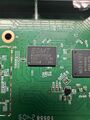 ESMT M14D5121632A RAM
 -
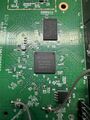 Mediatek MT7628AN CPU
 -
 UART Pinout


Categories:
- TP-LINK
- Embedded system/wireless router
- Embedded System MediaTek
- Embedded System MT7628
- MediaTek
- Embedded System MIPS 24KEc
- Embedded System
- OpenWrt Supported
- Has Mimo Status
- Embedded System IEEE 802.11b/g/n
- Embedded System MT7613
- Embedded System IEEE 802.11a/n/ac
- Dual-Radio Wireless Embedded System
- Wireless Embedded System
- Dual-Band
- English Documentation


