Arcadyan WE410443
From TechInfoDepot
Jump to navigationJump to search
 | This article's use of red links may need cleanup. |
| abgn+ac (AC2400) | |||||||
|---|---|---|---|---|---|---|---|
| AC2600 Wi-Fi Repeater | |||||||
 | |||||||
| WikiDevi.wi-cat.ru | Arcadyan WE410443 | ||||||
| 3rd Party Firmware | |||||||
| dd-wrt | Status Unknown | ||||||
| OpenWrt | Supported | ||||||
| Tomato any flavor | Incompatible | ||||||
| Gargoyle | Status Unknown | ||||||
| Platform | |||||||
| Brand • Model • Rev | Arcadyan WE410442-HS (R01) | ||||||
| FCC ID | RAXWE410443 | ||||||
| Type | range extender | ||||||
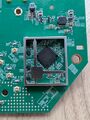
CPU1  | MediaTek MT7621AT | ||||||
| CPU1 Type | MIPS 1004Kc | ||||||
| CPU1 Speed | 880 MHz ( 2 cores ) 16-bit | ||||||
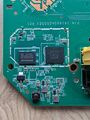
| Flash1 Chip | Winbond W25Q256JVFJQ | ||||||
| Flash1 Size | 32 MiB 33,554,432 B <br />262,144 Kib <br />32,768 KiB <br />256 Mib <br />0.0313 GiB <br /> | ||||||
| RAM1 Size | 128 MiB 134,217,728 B <br />1,048,576 Kib <br />131,072 KiB <br />1,024 Mib <br />0.125 GiB <br /> | ||||||
| RAM1 Chip | Winbond W631GG6KB-12 | ||||||
| ETH chip1 | MediaTek MT7621AT | ||||||
| ETH chip2 | MediaTek MT7530 | ||||||
| Ethernet Port Count | 1-1GbE-LAN | ||||||
| Wired Standard | IEEE 802.3i/3u/3ab | ||||||
|
802dot11 OUI: none specified | |||||||
| Stock bootloader | U-Boot | ||||||
| Expansion IF types | none specified | ||||||
| Power | 12 VDC, 1.5 A | ||||||
| Connector type | barrel | ||||||
| Serial Port (UART) | yes, 3.3V TTL, (57600 8N1) | ||||||
| JTAG Port | no | ||||||
|
| |||||||
|
| |||||||
| Other | |||||||
|
| |||||||
| Manuf/OEM/ODM | Arcadyan | ||||||
| 3rd Party Firmware Support |
OpenWrt • (List | Dev | DLs) | ||||||
| Retail | |||||||
| FCC approval date | 08 May 2017 | ||||||
| Country of manuf | China | ||||||
| Radio 1 | |||||||
| Chip1 | MediaTek MT7615N | ||||||
| Wireless interface OUI | none specified | ||||||
| Antenna Connector Type | U.FL | ||||||
| MIMO status | 4x4:4 | ||||||
| Wireless Standard | IEEE 802.11b/g/n | ||||||
| 802.11n | up to 600 Mbps | ||||||
| 802.11g | up to 54 Mbps | ||||||
| 802.11b | up to 11 Mbps | ||||||
| WiFi Operating Frequency | 2.4 GHz | ||||||
| Radio 2 | |||||||
| Chip1 | MediaTek MT7615N | ||||||
| Wireless interface OUI | none specified | ||||||
| Antenna Connector Type | U.FL | ||||||
| MIMO status | 4x4:4 | ||||||
| Wireless Standard | IEEE 802.11a/n/ac | ||||||
| 802.11ac | up to 1733 Mbps | ||||||
| 802.11n | up to 600 Mbps | ||||||
| 802.11a | up to 54 Mbps | ||||||
| WiFi Operating Frequency | 5 GHz | ||||||
| |||||||
For a list of all currently documented MediaTek chipsets with specifications, see MediaTek.
For a list of all currently documented Arcadyan devices with specifications, see Arcadyan.
Overview
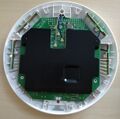
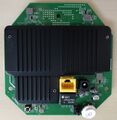
"P/N: 141410420000J R01" is silkscreened on the board
- A manual is available online (Singtel).
Availability
The device is distributed by various ISPs under various names, including:
- KPN SuperWiFi (-99)
- BT Whole Home Wi-Fi (?) (-SA)
- Telus WiFi Booster (-TS)
- Hughes Wi-Fi Booster (RE2000) (-HS)
- Singtel Mesh Extender (-ST)
- EE WiFi Disc
- Chunghwa Telecom Wi-Fi 5 (4T4R) (-TC)
Flashing
 | NOTE: During configuration or flashing a device, the only things that should be hooked to the device is the computer and power. |
Flashing OpenWrt
Target: ramips
Subtarget: mt7621
Package architecture: mipsel_24kc
Supported Since Commit
Support started version: 24.10.2
Current supported version: 24.10.5
Subtarget: mt7621
Package architecture: mipsel_24kc
Supported Since Commit
Support started version: 24.10.2
Current supported version: 24.10.5
LAN Hardware: MediaTek MT7530 in MT7621AT
WLAN Hardware: 2x MediaTek MT7615N
Installation method(s):
see devicepage
Install Comment:
Flash BIN directly to SPI
Recovery method(s):
see devicepage
Comment:
The device is distributed by various ISPs under various names, including: KPN SuperWiFi, BT Whole Home Wi-Fi, Telus WiFi Booster, Hughes Wi-Fi Booster, Singtel Mesh Extender, EE WiFi Disc, Chunghwa Telecom Wi-Fi 5 (4T4R)
WLAN Hardware: 2x MediaTek MT7615N
Installation method(s):
see devicepage
Install Comment:
Flash BIN directly to SPI
Recovery method(s):
see devicepage
Comment:
The device is distributed by various ISPs under various names, including: KPN SuperWiFi, BT Whole Home Wi-Fi, Telus WiFi Booster, Hughes Wi-Fi Booster, Singtel Mesh Extender, EE WiFi Disc, Chunghwa Telecom Wi-Fi 5 (4T4R)
| git • >> |
|---|
ramips: mt7621: add support for Arcadyan WE410443 The Arcadyan WE410443 is a WiFi AC access point distributed by various ISPs under various names, including KPN SuperWifi and BT Whole Home Wi-Fi. It features one ethernet port, dual MT7615N radios and four internal antennas. Hardware: - SoC: Mediatek MT7621AT - Flash: 32 MB - RAM: 128 MB - Ethernet: 1x 10/100/1000 Mbps, built into the SoC - WLAN: 2x MediaTek MT7615N - Buttons: 1 Reset button, 1 WPS button - LEDs: 1x Green, 1x Blue, 1x Red, all unmarked - Power: 12 VDC, 1.5A barrel Installation: The bootloader is locked with a password, so the image needs to be written directly to the SPI flash chip. To do this, you need to open up the case, remove the heatsink and connect the flash chip to a Raspberry Pi. Use the following connections: Flash chip --> Raspberry Pi VCC --> 3v3 RESET --> 3v3 /CS --> GPIO 8 DO --> GPIO 9 CLK --> GPIO 11 DI --> GPIO 10 GND --> Ground You can solder wires to the flash chip, or use a SOIC16 clip. More details on the Raspberry Pi and SPI chip pinouts are available on the wiki [1] When you have the Raspberry Pi connected to the flash chip, boot your Pi and follow the instructions: 1) Make sure your Pi has SPI enabled with sudo raspi-config 2) Install necessary tools: sudo apt install xxd libubootenv-tool mtd-utils 3) Upload overlay and execute: sudo dtc -@ -I dts -O dtb -o /boot/overlays/we410443.dtbo we410443-overlay.dts 4) Enable in /boot/firmware/config.txt by adding a new line containing dtoverlay=we410443 5) Reboot your Pi and verify the mtd partitions with cat /proc/mtd, you should see: dev: size erasesize name mtd0: 02000000 00001000 "all" mtd1: 00030000 00001000 "u-boot" mtd2: 00010000 00001000 "u-boot-env" mtd3: 00010000 00001000 "factory" mtd4: 01f60000 00001000 "firmware" mtd5: 00010000 00001000 "glbcfg" mtd6: 00010000 00001000 "config" mtd7: 00010000 00001000 "glbcfg2" mtd8: 00010000 00001000 "config2" 6) Optionally (but recommended), make a backup: sudo dd if=/dev/mtd0 of=backup.bin It can be restored with: sudo flashcp backup.bin /dev/mtd0 7) Set the variables for the bootloader: echo '/dev/mtd2 0x0 0x1000 0x1000' > fw_env.config sudo fw_setenv -c fw_env.config bootpartition 0 8) Finally, flash the image: sudo flashcp openwrt-ramips-mt7621-arcadyan_we410443- squashfs-sysupgrade.bin /dev/mtd4 MAC addresses The label address is stored in ASCII in the config partition Use --> Address Device --> label Ethernet --> label WLAN 2g --> + 1 WLAN 5g --> + 2 References: [1] https://openwrt.org/toh/arcadyan/astoria/we410443 Signed-off-by: Sander van Deijck Link: https://github.com/openwrt/openwrt/pull/17981 Signed-off-by: Hauke Mehrtens |
Pictures
-
-
-

-

-
-

-
-
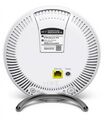 BT Whole Home Wi-Fi
 -
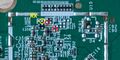


See also
- Arcadyan WE410443 • Arcadyan • AC2600 Wi-Fi Repeater
- Arcadyan WE410443-HS • Hughes Wi-Fi Booster (RE2000) • FCC
- Arcadyan WE410443-SA • BT Whole Home Wi-Fi • British Telecom
- Arcadyan WE410443-ST • Singtel Mesh Extender
- Arcadyan WE410443-TC • Chunghwa Telecom (Wi-Fi 5_4T4R)
- Arcadyan WE420223-99 • KPN Experia WiFi • Spec.
- Arcadyan WE420242(-LSW) • Swisscom WLAN-Box
- Arcadyan WE420244(C-LT) • Orange Repetidor Wi-Fi Premium
- Arcadyan WE620242-99 • KPN Super WiFi 2.0 • WFA
- Arcadyan WE620242-ET • eLife Connect+ C1+AA
- Arcadyan WE630242-LSW • Swisscom WLAN-Box 2
- Arcadyan WE6204430 • T-Mobile WiFi Extender • FCC
- Arcadyan WE7224443(B-VR) • Verizon Wi-Fi Extender (CE1000A) • FCC
- Arcadyan WE7302442-LSW • Swisscom WLAN-Box 3
Categories:
- Arcadyan
- Embedded system/range extender
- Embedded System MediaTek
- Embedded System MT7621AT
- MediaTek
- Embedded System MIPS 1004Kc
- Embedded System
- Embedded System MT7530
- Manuf Arcadyan
- OpenWrt Supported
- Embedded System MT7615N
- Has Mimo Status
- Embedded System IEEE 802.11b/g/n
- Embedded System IEEE 802.11a/n/ac
- Dual-Radio Wireless Embedded System
- Wireless Embedded System
- Dual-Band
- English Documentation


