Linksys EA7500 v3
From TechInfoDepot
Jump to navigationJump to search
| abgn+ac (AC1900) | |||||||||||||||||
|---|---|---|---|---|---|---|---|---|---|---|---|---|---|---|---|---|---|
| Max-Stream AC1900 MU-MIMO Gigabit Wi-Fi Router | |||||||||||||||||
 | |||||||||||||||||
| Wikipedia | Linksys routers | ||||||||||||||||
| WikiDevi.wi-cat.ru | Linksys EA7500 v3 | ||||||||||||||||
| 3rd Party Firmware | |||||||||||||||||
| dd-wrt | Status Unknown | ||||||||||||||||
| OpenWrt | Partial Support | ||||||||||||||||
| Tomato any flavor | Incompatible | ||||||||||||||||
| Gargoyle | Status Unknown | ||||||||||||||||
| Platform | |||||||||||||||||
| Brand • Model • Rev | Linksys EA7500 v3 | ||||||||||||||||
| FCC ID | Q87-03459 | ||||||||||||||||
| Board ID | 3763-53300012R | ||||||||||||||||
| Type | wireless router | ||||||||||||||||
CPU1  | MediaTek MT7629BA | ||||||||||||||||
| CPU1 Type | ARM Cortex-A7 | ||||||||||||||||
| CPU1 Speed | 1.25 GHz ( 2 cores ) | ||||||||||||||||
| Flash1 Chip | Macronix MX35LF1GE4AB-Z4I | ||||||||||||||||
| Flash1 Size | 128 MiB 134,217,728 B <br />1,048,576 Kib <br />131,072 KiB <br />1,024 Mib <br />0.125 GiB <br /> (SPI Serial) | ||||||||||||||||
| RAM1 Size | 256 MiB 268,435,456 B <br />2,097,152 Kib <br />262,144 KiB <br />2,048 Mib <br />0.25 GiB <br /> (DDR3L SDRAM) | ||||||||||||||||
| RAM1 Chip | Winbond W632GU6NB-11 | ||||||||||||||||
| ETH chip1 | MediaTek MT7629BA | ||||||||||||||||
| Switch | MediaTek MT7531BE | ||||||||||||||||
| Ethernet Port Count |
1-1GbE-WAN 4-1GbE-LAN | ||||||||||||||||
| Wired Standard | IEEE 802.3i/3u/3ab | ||||||||||||||||
| Stock bootloader | U-Boot 2014.04 rc1 | ||||||||||||||||
| Stock FW OS | Linux 4.4.146 | ||||||||||||||||
| Expansion IF types | USB 3.0 | ||||||||||||||||
| USB ports | 1 | ||||||||||||||||
| USB Hub Compatible | Untested | ||||||||||||||||
| Power | 12 VDC, 1 A | ||||||||||||||||
| Connector type |
barrel 5.5 mm (OD) 2.1 mm (ID) 9.5 mm (LEN) | ||||||||||||||||
| Serial Port (UART) | yes, 5-pin header, populated, J1, 3.3V TTL, (115200 8N1) | ||||||||||||||||
|
Flags: | |||||||||||||||||
|
| |||||||||||||||||
| Other | |||||||||||||||||
|
Default SSID: LinksysXXXXX (17 addl. devices) | |||||||||||||||||
| Manuf/OEM/ODM | CyberTAN EWW533 A1-BL-XB-015 | ||||||||||||||||
| 3rd Party Firmware Support |
OpenWrt • (List | Dev | DLs) , (w/ severe limitations) | ||||||||||||||||
| Retail | |||||||||||||||||
| FCC approval date | 08 November 2019 | ||||||||||||||||
| UPC |
745883787883 (UPC DB, On eBay) | ||||||||||||||||
| Country of manuf | Vietnam | ||||||||||||||||
| Radio 1 | |||||||||||||||||
| Chip1 | MediaTek MT7761N | ||||||||||||||||
| Wireless interface OUI | C4:41:1E | ||||||||||||||||
| Antenna Connector Type | none specified | ||||||||||||||||
| MIMO status | 3x3:3 | ||||||||||||||||
| Wireless Standard | IEEE 802.11b/g/n | ||||||||||||||||
| n-QAM | up to 600 Mbps | ||||||||||||||||
| 802.11n | up to 450 Mbps | ||||||||||||||||
| 802.11g | up to 54 Mbps | ||||||||||||||||
| 802.11b | up to 11 Mbps | ||||||||||||||||
| WiFi Operating Frequency | 2.4 GHz | ||||||||||||||||
| Radio 2 | |||||||||||||||||
| Chip1 | MediaTek MT7762N | ||||||||||||||||
| Wireless interface OUI | C4:41:1E | ||||||||||||||||
| Antenna Connector Type | none specified | ||||||||||||||||
| MIMO status | 3x3:3 | ||||||||||||||||
| Wireless Standard | IEEE 802.11a/n/ac | ||||||||||||||||
| 802.11ac | up to 1300 Mbps | ||||||||||||||||
| 802.11n | up to 450 Mbps | ||||||||||||||||
| 802.11a | up to 54 Mbps | ||||||||||||||||
| WiFi Operating Frequency | 5 GHz | ||||||||||||||||
| |||||||||||||||||
For a list of all currently documented MediaTek chipsets with specifications, see MediaTek.
For a list of all currently documented Linksys devices with specifications, see Linksys.
Overview
"3763-53300012R" is silkscreened on the board (CyberTAN EWW533 A1)
- U92S051CT00 LF 036 (Foxconn)
Hardware specification
- CPU: MediaTek MT7629BA @1.25GHz
- SoC: Dual-core ARM (Cortex-A7)
- Flash: 16MB (SPI Serial)
- Memory: 256MB (DDR3L) SDRAM
- Wi-Fi: MediaTek MT7661N/MT7662N
- 802.11abgn/ac Dual Band (2.4/5GHz)
- 3×3 2.4GHz + 3×3 5GHz
- Network: 5x GbE port
- Power Source: 12V/2A via barrel
Flashing
 | NOTE: During configuration or flashing a device, the only things that should be hooked to the device is the computer and power. |
Flashing OpenWrt
Target: mediatek
Subtarget: mt7629
Package architecture: arm_cortex-a7
Supported Since Commit
Support started version: 24.10.0
Current supported version: 24.10.5
Subtarget: mt7629
Package architecture: arm_cortex-a7
Supported Since Commit
Support started version: 24.10.0
Current supported version: 24.10.5
Unsupported Functions:
MT7762N devices (WiFi, 2nd CPU core)
LAN Hardware: MediaTek MT7531BE
WLAN Hardware: MediaTek MT7761N, MediaTek MT7762N
WLAN Comment: 3x3:3 MIMO on both bands
Installation method(s):
see git-commit
Recovery method(s):
see git-commit
Comment:
Limitations (same as other MT7629/MT7761N/MT7762N devices): 1. Wifi is not working 2. Second core is not working (kernel error message "CPU1: failed to come online")
MT7762N devices (WiFi, 2nd CPU core)
LAN Hardware: MediaTek MT7531BE
WLAN Hardware: MediaTek MT7761N, MediaTek MT7762N
WLAN Comment: 3x3:3 MIMO on both bands
Installation method(s):
see git-commit
Recovery method(s):
see git-commit
Comment:
Limitations (same as other MT7629/MT7761N/MT7762N devices): 1. Wifi is not working 2. Second core is not working (kernel error message "CPU1: failed to come online")
| git • >> |
|---|
mediatek: Add support for Linksys EA7500 v3 Specification: - MT7629 CPU - MT7531 switch - MT7761N and MT7762N wifi - 256 MB RAM - 128 MB NAND flash with dual-boot partitions - 2 buttons: WPS and reset - 1 WAN port (1G) - 4 LAN ports (1G) - 1 USB port Limitations (same as other MT7629/MT7761N/MT7762N devices): - Wifi is not working - Second core is not working (kernel error message "CPU1: failed to come online") Disassembly: - There are two screws under the front rubber feet and two under the label on the bottom (in the corners towards the back, you should be able to feel them). Serial Interface: - UART pin header is already soldered on the board. Pinning from front to back: 1 - VCC 2 - TX 3 - RX 4 - n/a 5 - GND GPIO: - 1 white LED, connected to GPIO 52 - 1 reset button, connected to GPIO 60 - 1 WPS button, connected to GPIO 58 MAC Adresses: - The MAC address printed on the device label is used for LAN and WAN - The MAC address is stored in the devinfo partition in ASCII format (hw_mac_addr=aa:bb:cc:dd:ee) - 2.4 GHz wifi uses MAC of the device label + 1 - 5 GHz wifi uses MAC of the device label + 2 Flashing: - OpenWrt is only runnig in the first partition of dual boot - To ensure to be able to go back to the factory image, flash the last OEM firmware via OEM web interface. This will ensure that the OEM firmware is present on both partitions - Because of dual boot partitions, flashing via OEM interface is not supported - Start a TFTP server and provide the initramfs image. Default settings: - Router IP: 192.168.1.1 - TFTP server IP: 192.168.1.100 - TFTP file name: 7531.bin - Open the device, connect UART and select " 1. System Load Linux to SDRAM via TFTP." during startup - Adapt the settings to your environment, if required - After initramfs is booted, flash the sysupgrade image Return to OEM firmware: - Run the following commands in OpenWrt to switch to the second partition fw_setenv boot_part 2 fw_setenv bootimage 2 - Reboot the device. OEM firmware will start up again |
Pictures
-
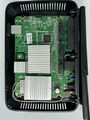 Internal
 -
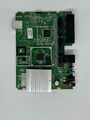 Board Top
 -
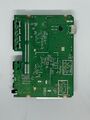 Board Bottom


Categories:
- Linksys
- Embedded system/wireless router
- Embedded System MediaTek
- Embedded System MT7629BA
- MediaTek
- Embedded System ARM
- Embedded System Cortex-A7
- Embedded System MT7531BE
- Manuf CyberTAN
- OpenWrt Supported
- Embedded System MT7761N
- Has Mimo Status
- Embedded System IEEE 802.11b/g/n
- Embedded System MT7762N
- Embedded System IEEE 802.11a/n/ac
- Dual-Radio Wireless Embedded System
- Wireless Embedded System
- Dual-Band
- Embedded System
- English Documentation


