Netgear GS308T
From TechInfoDepot
Jump to navigationJump to search
| 8-Port Gigabit Ethernet Smart Switch | ||||||||||
 | ||||||||||
| Support | Support page | |||||||||
|---|---|---|---|---|---|---|---|---|---|---|
| WikiDevi.wi-cat.ru | Netgear GS308T | |||||||||
| 3rd Party Firmware | ||||||||||
| dd-wrt | Incompatible | |||||||||
| OpenWrt | Supported | |||||||||
| Tomato any flavor | Incompatible | |||||||||
| Gargoyle | Status Unknown | |||||||||
| Platform | ||||||||||
| Brand • Model • Rev | Netgear GS308T V1 | |||||||||
CPU1  | Realtek RTL8380M | |||||||||
| CPU1 Type | MIPS 4KEc | |||||||||
| CPU1 Speed | 500 MHz | |||||||||
| Flash1 Chip | Winbond W25Q256JVFQ | |||||||||
| Flash1 Size | 32 MiB 33,554,432 B <br />262,144 Kib <br />32,768 KiB <br />256 Mib <br />0.0313 GiB <br /> (SPI NOR) | |||||||||
| RAM1 Size | 128 MiB 134,217,728 B <br />1,048,576 Kib <br />131,072 KiB <br />1,024 Mib <br />0.125 GiB <br /> (DDR3 1600) | |||||||||
| RAM1 Chip | Winbond W631GG8MB-12 | |||||||||
| ETH chip1 | Realtek RTL8380M | |||||||||
| Switch | Realtek RTL8380M | |||||||||
| Ethernet Port Count | 8-1GbE | |||||||||
| Ethernet connector | 8P8C | |||||||||
| Wired Standard | IEEE 802.3i/3u/3ab | |||||||||
| Auto-MDIX | supported | |||||||||
| Jumbo frame | unspecified | |||||||||
| Switch Class | smart | |||||||||
| Expansion IF types | none specified | |||||||||
| Stock bootloader | U-Boot | |||||||||
| Power | 12 VDC, 1 A | |||||||||
| Connector type |
barrel 5.5 mm (OD) 2.1 mm (ID) 9.5 mm (LEN) | |||||||||
| Serial Port (UART) | yes, 4-pin header, unpopulated, J1, 3.3V TTL, (115200 8N1) | |||||||||
| Other | ||||||||||
|
Default IP address: 192.168.0.239 | ||||||||||
|
Flags: Smart switch, LACP, SNMP, heatsink, metal case | ||||||||||
| 3rd Party Firmware Support |
OpenWrt • (List | Dev | DLs) | |||||||||
|
Additional chips | ||||||||||
| Retail | ||||||||||
| (Est.) release date | April 2019 | |||||||||
| (Est.) initial retail price (in USD) | $70 | |||||||||
| Newegg | 0XP-001M-003U1 | |||||||||
| UPC |
606449135664 (UPC DB, On eBay) | |||||||||
| ASIN |
B01MYTIPG2  | |||||||||
| Country of manuf | Thailand | |||||||||
| ||||||||||
For a list of all currently documented Realtek chipsets with specifications, see Realtek.
For a list of all currently documented Netgear devices with specifications, see Netgear.
Overview
Specifications
- Processor: Realtek RTL8380M Multi-Layer Managed Switch
- Controller with Embedded MIPS 4KEc @500MHz
- Flash/RAM: 32MB (SPI NOR) Flash, 128MB RAM (DDR3L)
- 8x Gigabit Ethernet ports
- 16Gbps switching capacity
Flashing
 | NOTE: During configuration or flashing a device, the only things that should be hooked to the device is the computer and power. |
Flashing OpenWrt
Target: realtek
Subtarget: rtl838x
Package architecture: mips_4kec
Supported Since Commit
Support started version: 22.03.0
Current supported version: 25.12.1
Subtarget: rtl838x
Package architecture: mips_4kec
Supported Since Commit
Support started version: 22.03.0
Current supported version: 25.12.1
LAN Hardware: Realtek RTL8380M
WLAN Hardware: none
WLAN Comment: No WLAN
Installation method(s):
GUI OEM, U-Boot TFTP recovery
Install Comment:
Flash initramfs-kernel image to slot "Image 1" and reboot, then use sysupgrade to install a sysupgrade image permanently
Recovery method(s):
U-Boot TFTP recovery
Recovery Comment:
Stock firmware still available in alternate partition which can be set from U-Boot
WLAN Hardware: none
WLAN Comment: No WLAN
Installation method(s):
GUI OEM, U-Boot TFTP recovery
Install Comment:
Flash initramfs-kernel image to slot "Image 1" and reboot, then use sysupgrade to install a sysupgrade image permanently
Recovery method(s):
U-Boot TFTP recovery
Recovery Comment:
Stock firmware still available in alternate partition which can be set from U-Boot
| git • >> |
|---|
realtek: Add support for Netgear S350 series switches GS308T and GS310TP
The Netgear GS308T v1 is an 8 port gigabit switch.  The GS310TP v1 is an 8
port POE+ gigabit switch with 2 SFP Ports (currently untested).

The GS308T v1 and GS310TP v1 are quite similar to the Netgear GS1xx
devices already supported.  Theses two devices use the same Netgear
firmware and are very similar to there corresponding GS1xx devices. For
this reason they share a large portion of the device tree with the GS108T
and GS110TP with exception of the uimage magic and model and compatible
values.

All of the above feature a dual firmware layout, referred to as Image0
and Image1 in the Netgear firmware.

In order to manipulate the PoE+ on the GS310TP v1 , one needs the
rtl83xx-poe package

Specifications (GS308T)
----------------------

 * RTL8380M SoC, 1 MIPS 4KEc core @ 500MHz
 * 128MB DDR3-1600 DRAM (Winbond W631GG8MB-12)
 * 32MB 3v NOR SPI Flash (Winbond W25Q256JVFQ)
 * RTL8231 GPIO extender to control the LEDs and the reset button
 * 8 x 10/100/1000BASE-T ports, internal PHY (RTL8218B)
 * UART (115200 8N1) via unpopulated standard 0.1" pin header marked J1
 * Power is supplied via a 12V 1A barrel connector

Specifications (GS310TP)
----------------------

 * RTL8380M SoC, 1 MIPS 4KEc core @ 500MHz
 * Nuvoton M0516LDN for controlling PoE
 * 128MB DDR3-1600 DRAM (Winbond W631GG8MB-12)
 * 32MB 3v NOR SPI Flash (Winbond W25Q256JVFQ)
 * RTL8231 GPIO extender to control the LEDs and the reset button
 * 8 x 10/100/1000BASE-T PoE+ ports, 2 x Gigabit SFP ports,
 internal PHY (RTL8218B)
 * UART (115200 8N1) via unpopulated standard 0.1" pin header marked J1
 * Power is supplied via a 54V 1.25A barrel connector

Both devices have UART pinout
-----------

J1 | [o]ooo
      ^ ||`------ GND
      | |`------- RX         [TX out of the serial adapter]
      | `-------- TX         [RX into the serial adapter]
      `---------- Vcc (3V3)  [the square pin]

The through holes are filled with PB-free solder which melts at 375C.
They can also be drilled using a 0.9mm bit.

Installation
------------
Instructions are identical to those for the similar Negear devices
and apply both to the GS308T v1 and GS310TP v1 as well.
-------------------
Boot initramfs image from U-Boot
--------------------------------

 1. Press the Escape key at the `Hit Esc key to stop autoboot` prompt
 2. Init network with `rtk network on` command
 3. Load image with `tftpboot 0x8f000000
openwrt-realtek-generic-netgear_gs308t-v1-initramfs-kernel.bin` command
 4. Boot the image with `bootm` command

The switch defaults to IP 192.168.1.1 and tries to fetch the image via
TFTP from 192.168.1.111.

Updating the installed firmware
-------------------------------

The OpenWRT ramdisk image can be flashed directly from the Netgear UI.
The Image0 slot should be used in order to enable sysupgrade.

As with similar switches, changing the active boot partition can be
accomplished in U-Boot as follows:

 1. Press the Escape key at the `Hit Esc key to stop autoboot` prompt
 2. Run `setsys bootpartition {0|1}` to select the boot partition
 3. Run `savesys` followed by `boota` to proceed with the boot process
|
Pictures

-
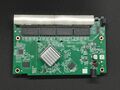 Board Top


