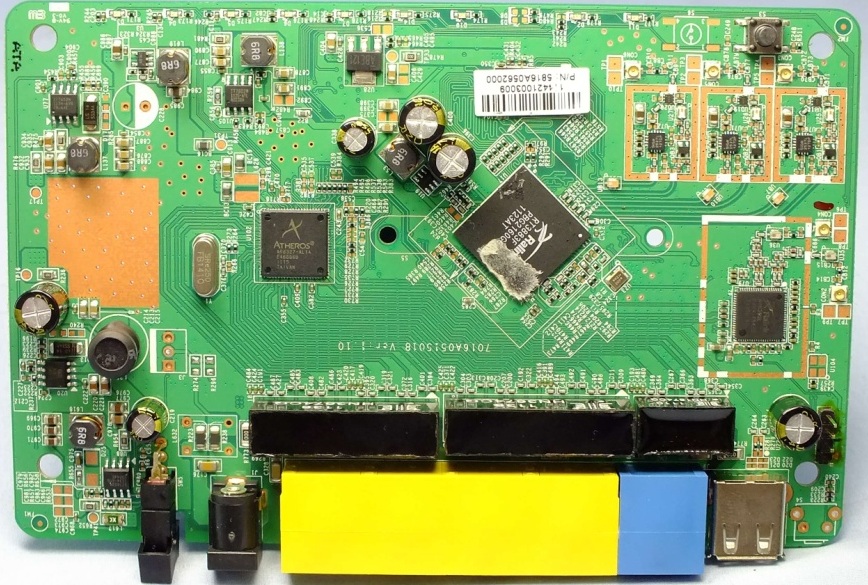
Sitecom WLR-6000
| abgn (AN750) | |||||
|---|---|---|---|---|---|
| Wireless Gigabit Router 750N X6 | |||||
 | |||||
| Homepage | Product page | ||||
| WikiDevi.wi-cat.ru | Sitecom WLR-6000 | ||||
| 3rd Party Firmware | |||||
| dd-wrt | Status Unknown | ||||
| OpenWrt | Supported | ||||
| Tomato any flavor | Incompatible | ||||
| Gargoyle | Status Unknown | ||||
| Platform | |||||
| Brand • Model • Rev | Sitecom WLR-6000 | ||||
| FCC ID | U2M-WBR5200MGN | ||||
| Type | wireless router | ||||
CPU1  | Ralink RT3883 | ||||
| CPU1 Type | MIPS 74Kc | ||||
| CPU1 Speed | 500 MHz | ||||
| Flash1 Chip | Macronix 25L6406E | ||||
| Flash1 Size | 16 MiB 16,777,216 B <br />131,072 Kib <br />16,384 KiB <br />128 Mib <br />0.0156 GiB <br /> | ||||
| RAM1 Size | 64 MiB 67,108,864 B <br />524,288 Kib <br />65,536 KiB <br />512 Mib <br />0.0625 GiB <br /> | ||||
| RAM1 Chip | Nanya NT5TU32M16DG-AC | ||||
| ETH chip1 | Ralink RT3883 | ||||
| Switch | Atheros AR8327 | ||||
| Ethernet Port Count |
1-1GbE-WAN 4-1GbE-LAN | ||||
| Wired Standard | IEEE 802.3i/3u/3ab | ||||
| Stock bootloader | U-Boot 1.1.3 Ralink 3.1.0.0 | ||||
| Stock FW OS | Linux 2.6.21 Ralink SDK 3.1.0.0 | ||||
| Expansion IF types | USB 2.0 | ||||
| USB ports | 1 | ||||
| USB Hub Compatible | Untested | ||||
| Power | 12 VDC, 1.25 A | ||||
| Connector type |
barrel 5.5 mm (OD) 2.1 mm (ID) 9.5 mm (LEN) | ||||
| Serial Port (UART) | yes, 4-pin header, unpopulated, J12, 3.3V TTL, (57600 8N1) | ||||
|
| |||||
|
Additional chips | |||||
| Other | |||||
|
Default SSID: SitecomXXXXXX (4 addl. devices) | |||||
| Manuf/OEM/ODM | Senao | ||||
| 3rd Party Firmware Support |
OpenWrt • (List | Dev | DLs) | ||||
| Retail | |||||
| Availability | End of Life | ||||
| FCC approval date | 04 January 2012 | ||||
| EAN |
8716502023660 (UPC DB, On eBay) | ||||
| ASIN |
B005GX9WZA  | ||||
| Country of manuf | Taiwan | ||||
| Radio 1 | |||||
| Chip1 | Ralink RT3883 | ||||
| Wireless interface OUI | 64:D1:A3, 00:0C:F6 | ||||
| Antenna Connector Type | U.FL | ||||
| MIMO status | 3x3:3 | ||||
| Wireless Standard | IEEE 802.11a/n | ||||
| 802.11n | up to 450 Mbps | ||||
| 802.11a | up to 54 Mbps | ||||
| WiFi Operating Frequency | 5 GHz | ||||
| Radio 2 | |||||
| Chip1 | Ralink RT5392 | ||||
| Wireless interface OUI | 64:D1:A3, 00:0C:F6 | ||||
| Antenna Connector Type | U.FL | ||||
| MIMO status | 2x2:2 | ||||
| Wireless Standard | IEEE 802.11b/g/n | ||||
| 802.11n | up to 300 Mbps | ||||
| 802.11g | up to 54 Mbps | ||||
| 802.11b | up to 11 Mbps | ||||
| WiFi Operating Frequency | 2.4 GHz | ||||
| |||||
For a list of all currently documented Atheros (QCA) chipsets with specifications, see Atheros.
For a list of all currently documented Ralink chipsets with specifications, see Ralink.
For a list of all currently documented Sitecom devices with specifications, see Sitecom.
Overview
This device is presumed to be a Senao WBR5200MGN. It's noted in its FCC test report
- (and the FCC EUT's board is silkscreened w/ text indicating it's a WLR-6000 v1).
- The FCC ID of the WBR5200MGN has been assigned to this entry, but there is likely
- (almost certainly..) no FCC ID on the device's label.
Per the manual, the password is on the label of the device.
Links of Interest
Flashing
 | NOTE: During configuration or flashing a device, the only things that should be hooked to the device is the computer and power. |
Flashing OpenWrt
 | This device is NOT RECOMMENDED for future use with OpenWrt due to low flash/ram.
DO NOT BUY DEVICES WITH 8MB FLASH / 64MB RAM if you intend to flash an up-to-date and secure OpenWrt version onto it! See 8/64 warning for details. This device does not have sufficient resources (flash and/or RAM) to provide secure and reliable operation. This means that you will not be able to install many packages, and that you might experience crashes due to OOM situations more or less often. See OpenWrt on 8/64 devices what you can do now. |
Subtarget: rt3883
Package architecture: mipsel_74kc
Supported Since Commit
Support started version: 17.01.0
Current supported version: 25.12.1
WLAN Hardware: Ralink RT3883, Ralink RT5392
WLAN Comment: 2.4Ghz 2x2:2 MIMO, 5Ghz 3x3:3 MIMO
Install Comment:
unknown
| git • >> |
|---|
ramips: add support for Sitecom WLR-6000 The Sitecom firmware upgrade file has SENAO_FIRMWARE_TYPE 2 set. This looks rather wrong since SENAO_FIRMWARE_TYPE 2 is kernel only but the file is way to big for only including a kernel. The factory image need to have the dlf file extension. Otherwise the Sitecom firmware rejects the file. The stock firmware uses the following mac addresses: LAN: 00:0C:F6:AA:BB:D8 (u-boot env: ethaddr) 2,4: 00:0C:F6:AA:BB:D8 (EEPROM) 5: 00:0C:F6:AA:BB:DC (EEPROM) WAN: 00:0C:F6:AA:C8:43 (u-boot env: wanaddr) Assuming the mac address range :D8 to :DC is reserved for this device, the MAC addresses were reorder to have a unique MAC address for each interface: 2.4GHz: 00:0C:F6:AA:BB:D8 LAN: 00:0C:F6:AA:BB:D9 WAN: 00:0C:F6:AA:BB:DA 5 GHz: 00:0C:F6:AA:BB:DC The first MAC is assigned to the 2.4GHz WiFi interface to keep compatibility with the SSIDs printed on the case, which have the last three sextets of the MAC address appended. There are still issues with the rt2x00 driver. It is not possible to use both wireless interfaces at the same time. The 2.4 GHz wireless (PCIe) only works if the internal 5GHz wireless is/has been enabled or used for scanning. The internal 5GHz wireless only works if the 2.4GHz wireless (PCIe) was never enabled. Disabling the 2.4Ghz after it was enabled will result in stations seeing the 5Ghz AP but are unable to connect. Due to the not optimal working wifi the manufacture, backup and storage partitions of the OEM firmware are kept for now to allow an easy switch back to the Sitecom firmware. |
- Sitecom
- Embedded system/wireless router
- Embedded System Ralink
- Embedded System RT3883
- Ralink
- Embedded System MIPS 74Kc
- Embedded System
- Embedded System Atheros
- Embedded System AR8327
- Atheros
- Manuf Senao
- OpenWrt Supported
- Has Mimo Status
- Embedded System IEEE 802.11a/n
- Embedded System RT5392
- Embedded System IEEE 802.11b/g/n
- Dual-Radio Wireless Embedded System
- Wireless Embedded System
- Dual-Band
- English Documentation