Sophos AP15
From TechInfoDepot
Jump to navigationJump to search
| bgn (N300) | |||||||||||||
|---|---|---|---|---|---|---|---|---|---|---|---|---|---|
| Sophos AP 15 Access Point | |||||||||||||
 | |||||||||||||
| WikiDevi.wi-cat.ru | Sophos AP 15 | ||||||||||||
| 3rd Party Firmware | |||||||||||||
| dd-wrt | Status Unknown | ||||||||||||
| OpenWrt | Supported | ||||||||||||
| Tomato any flavor | Incompatible | ||||||||||||
| Gargoyle | Status Unknown | ||||||||||||
| Platform | |||||||||||||
| Brand • Model • Rev | Sophos AP15 Rev. 1 | ||||||||||||
| FCC ID | 2ACTO-AP15 | ||||||||||||
| Board ID | 1244-01000933-50Z | ||||||||||||
| Type | access point | ||||||||||||
CPU1  | Qualcomm Atheros QCA9557 | ||||||||||||
| CPU1 Type | MIPS 74Kc | ||||||||||||
| CPU1 Speed | 720 MHz | ||||||||||||
| Flash1 Chip | Macronix MX25L12835FMI-10G | ||||||||||||
| Flash1 Size | 16 MiB 16,777,216 B <br />131,072 Kib <br />16,384 KiB <br />128 Mib <br />0.0156 GiB <br /> (SPI NOR) | ||||||||||||
| RAM1 Size | 128 MiB 134,217,728 B <br />1,048,576 Kib <br />131,072 KiB <br />1,024 Mib <br />0.125 GiB <br /> (DDR2 SDRAM) | ||||||||||||
| RAM1 Chip | Winbond W9751G6KB-25 x 2 | ||||||||||||
| ETH chip1 | Qualcomm Atheros QCA9557 | ||||||||||||
| ETH chip2 | Atheros AR8035-A | ||||||||||||
| Ethernet Port Count | 1-1GbE-LAN | ||||||||||||
| Wired Standard | IEEE 802.3i/3u/3ab | ||||||||||||
| Stock bootloader | U-Boot 1.1.4 | ||||||||||||
| Expansion IF types | none specified | ||||||||||||
| PoE | 802.3at, 802.3af, standard | ||||||||||||
| Power | 12 VDC, 1 A | ||||||||||||
| Connector type |
barrel 5.5 mm (OD) 2.5 mm (ID) 9.5 mm (LEN) | ||||||||||||
| Serial Port (UART) | yes, 4-pin header, populated, 3.3V TTL, (115200 8N1) | ||||||||||||
| JTAG Port | yes, 14-pin header, populated, J1 | ||||||||||||
|
Flags: | |||||||||||||
|
Additional chips | |||||||||||||
| Other | |||||||||||||
|
| |||||||||||||
| 3rd Party Firmware Support |
OpenWrt • (List | Dev | DLs) | ||||||||||||
| Retail | |||||||||||||
| Availability | End of Life | ||||||||||||
| End of Life date | 2020 | ||||||||||||
| FCC approval date | 03 September 2014 | ||||||||||||
| Newegg | 22Z-000Y-00057 | ||||||||||||
| Radio 1 | |||||||||||||
| Chip1 | Qualcomm Atheros QCA9557 | ||||||||||||
| Wireless interface OUI | 00:1A:8C | ||||||||||||
| Antenna Connector Type | U.FL, RP-SMA | ||||||||||||
| MIMO status | 2x2:2 | ||||||||||||
| Wireless Standard | IEEE 802.11b/g/n | ||||||||||||
| 802.11n | up to 300 Mbps | ||||||||||||
| 802.11g | up to 54 Mbps | ||||||||||||
| 802.11b | up to 11 Mbps | ||||||||||||
| WiFi Operating Frequency | 2.4 GHz | ||||||||||||
| |||||||||||||
For a list of all currently documented Atheros (QCA) chipsets with specifications, see Atheros.
For a list of all currently documented Qualcomm Atheros (QCA) chipsets with specifications, see Qualcomm Atheros.
For a list of all currently documented Sophos devices with specifications, see Sophos.
- • 300 Mbps - 2SS 2.4GHz 802.11n (40MHz chan.) = N300 class
Overview
"1244-01000933-50Z" and "BP ML E186014" are silkscreened on the board.
Hardware specification
- CPU: Qualcomm Atheros QCA9557 MIPS 74K (@720MHz)
- Memory: 128MB (SDRAM) DDR2
- Storage: 16MB SPI NOR Flash
- WiFi: Qualcomm Atheros QCA9557 (802.11bgn)
- Network: 1x Gigabit Ethernet ports
- Power: 12V, 1A via barrel or 802.3af/at PoE
Links of Interest
Flashing
 | NOTE: During configuration or flashing a device, the only things that should be hooked to the device is the computer and power. |
Flashing OpenWrt
Target: ath79
Subtarget: generic
Package architecture: mips_24kc
Supported Since Commit
Support started version: 23.05.0
Current supported version: 25.12.1
Subtarget: generic
Package architecture: mips_24kc
Supported Since Commit
Support started version: 23.05.0
Current supported version: 25.12.1
LAN Comment: Atheros AR8035-A GbE Phy
WLAN Hardware: Qualcomm Atheros QCA9557
WLAN Comment: MIMO 2x2:2
Installation method(s):
see git-commit
WLAN Hardware: Qualcomm Atheros QCA9557
WLAN Comment: MIMO 2x2:2
Installation method(s):
see git-commit
| git • >> |
|---|
ath79: add support for Sophos AP15
The Sophos AP15 seems to be very close to Sophos AP55/AP100.

Based on:
commit 6f1efb289837 ("ath79: add support for Sophos AP100/AP55 family")
author    Andrew Powers-Holmes <andrew@omnom.net>
          Fri, 3 Sep 2021 15:53:57 +0200 (23:53 +1000)
committer Hauke Mehrtens <hauke@hauke-m.de>
          Sat, 16 Apr 2022 16:59:29 +0200 (16:59 +0200)

Unique to AP15:
 - Green and yellow LED
 - 2T2R 2.4GHz 802.11b/g/n via SoC WMAC
 - No buttons
 - No piezo beeper
 - No 5.8GHz

Flashing instructions:
 - Derived from UART method described in referenced commit, methods
   described there should work too.
 - Set up a TFTP server; IP address has to be 192.168.99.8/24
 - Copy the firmware (initramfs-kernel) to your TFTP server directory
   renaming it to e.g. boot.bin
 - Open AP's enclosure and locate UART header (there is a video online)
 - Terminal connection parameters are 115200 8/N/1
 - Connect TFTP server and AP via ethernet
 - Power up AP and cancel autoboot when prompted
 - Prompt shows 'ath> '
 - Commands used to boot:
    ath> tftpboot 0x81000000 boot.bin
    ath> bootm 0x81000000
 - Device should boot OpenWRT
 - IP address after boot is 192.168.1.1/24
 - Connect to device via browser
 - Permanently flash using the web ui (flashing sysupgrade image)
 - (BTW: the AP55 images seem to work too, only LEDs are not working)

Testing done:
 - To be honest: Currently not so much testing done.
 - Flashed onto two devices
 - Devices are booting
 - MAC addresses are correct
 - LEDs are working
 - Scanning for WLANs is working

Big thanks to all the people working on this great project!
(Sorry about my english, it is not my native language)
|
Pictures
-
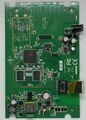 Board Top
 -
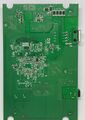 Board Bottom


Categories:
- Sophos
- Embedded system/access point
- Embedded System Qualcomm Atheros
- Embedded System QCA9557
- Qualcomm Atheros
- Embedded System MIPS 74Kc
- Embedded System
- Embedded System AR8035-A
- Embedded System Atheros
- Atheros
- OpenWrt Supported
- Has Mimo Status
- Embedded System IEEE 802.11b/g/n
- Single-Radio Wireless Embedded System
- Wireless Embedded System
- Single-Band
- English Documentation


