EnGenius EAP1750H
From TechInfoDepot
Jump to navigationJump to search
| abgn+ac (AC1750) | |||||||||||||||||
|---|---|---|---|---|---|---|---|---|---|---|---|---|---|---|---|---|---|
| 802.11ac 3x3 Dual Band Ceiling-Mount Wireless Access Point | |||||||||||||||||
 | |||||||||||||||||
| Homepage | Product page | ||||||||||||||||
| WikiDevi.wi-cat.ru | EnGenius EAP1750H | ||||||||||||||||
| 3rd Party Firmware | |||||||||||||||||
| dd-wrt | Status Unknown | ||||||||||||||||
| OpenWrt | Supported | ||||||||||||||||
| Tomato any flavor | Incompatible | ||||||||||||||||
| Gargoyle | Status Unknown | ||||||||||||||||
| Platform | |||||||||||||||||
| Brand • Model • Rev | EnGenius EAP1750H | ||||||||||||||||
| FCC ID | A8J-EAP1750H, U2M-PCE4553AH | ||||||||||||||||
| Board ID | 7016A0838008 | ||||||||||||||||
| Type | access point | ||||||||||||||||
CPU1  | Qualcomm Atheros QCA9558 | ||||||||||||||||
| CPU1 Type | MIPS 74Kc | ||||||||||||||||
| CPU1 Speed | 720 MHz | ||||||||||||||||
| Flash1 Chip | Macronix MX25L12845EMI-10G | ||||||||||||||||
| Flash1 Size | 16 MiB 16,777,216 B <br />131,072 Kib <br />16,384 KiB <br />128 Mib <br />0.0156 GiB <br /> | ||||||||||||||||
| RAM1 Size | 128 MiB 134,217,728 B <br />1,048,576 Kib <br />131,072 KiB <br />1,024 Mib <br />0.125 GiB <br /> | ||||||||||||||||
| RAM1 Chip | Nanya NT5TU32M16DG-AC x 2 | ||||||||||||||||
| ETH chip1 | Qualcomm Atheros QCA9558 | ||||||||||||||||
| ETH chip2 | Atheros AR8035-A | ||||||||||||||||
| Ethernet Port Count | 1-1GbE-LAN | ||||||||||||||||
| Wired Standard | IEEE 802.3i/3u/3ab | ||||||||||||||||
|
802dot11 OUI: none specified | |||||||||||||||||
| Expansion IF types | Mini PCIe | ||||||||||||||||
| Mini PCIe slots | 1 | ||||||||||||||||
| PoE | 802.3at, standard | ||||||||||||||||
| Power | 12 VDC, 2 A | ||||||||||||||||
| Connector type | barrel | ||||||||||||||||
| Serial Port (UART) | yes, 4-pin header, populated, J10, 3.3V TTL, (115200 8N1) | ||||||||||||||||
|
Flags: | |||||||||||||||||
|
| |||||||||||||||||
| Other | |||||||||||||||||
|
| |||||||||||||||||
| Manuf/OEM/ODM | Senao | ||||||||||||||||
| 3rd Party Firmware Support |
OpenWrt • (List | Dev | DLs) | ||||||||||||||||
| Retail | |||||||||||||||||
| Availability | End of Life | ||||||||||||||||
| FCC approval date | 22 May 2014 | ||||||||||||||||
| UPC |
655216006720 (UPC DB, On eBay) | ||||||||||||||||
| ASIN |
B00NC06J2S  | ||||||||||||||||
| Country of manuf | Taiwan | ||||||||||||||||
| Radio 1 | |||||||||||||||||
| Chip1 | Qualcomm Atheros QCA9558 | ||||||||||||||||
| Wireless interface OUI | none specified | ||||||||||||||||
| Antenna Connector Type | U.FL | ||||||||||||||||
| MIMO status | 3x3:3 | ||||||||||||||||
| Wireless Standard | IEEE 802.11b/g/n | ||||||||||||||||
| 802.11n | up to 450 Mbps | ||||||||||||||||
| 802.11g | up to 54 Mbps | ||||||||||||||||
| 802.11b | up to 11 Mbps | ||||||||||||||||
| WiFi Operating Frequency | 2.4 GHz | ||||||||||||||||
| Radio 2 | |||||||||||||||||
| Radio2 module | Senao PCE4553AH | ||||||||||||||||
| Radio2 module IF | Mini PCIe | ||||||||||||||||
| Chip1 | Qualcomm Atheros QCA9880 | ||||||||||||||||
| Wireless interface OUI | none specified | ||||||||||||||||
| Antenna Connector Type | U.FL | ||||||||||||||||
| MIMO status | 3x3:3 | ||||||||||||||||
| Wireless Standard | IEEE 802.11a/n/ac | ||||||||||||||||
| 802.11ac | up to 1300 Mbps | ||||||||||||||||
| 802.11n | up to 450 Mbps | ||||||||||||||||
| 802.11a | up to 54 Mbps | ||||||||||||||||
| WiFi Operating Frequency | 5 GHz | ||||||||||||||||
| |||||||||||||||||
For a list of all currently documented Atheros (QCA) chipsets with specifications, see Atheros.
For a list of all currently documented Qualcomm Atheros (QCA) chipsets with specifications, see Qualcomm Atheros.
For a list of all currently documented EnGenius devices with specifications, see EnGenius.
Overview
"7016A0838008" and "Ver: 1.00" is silkscreened on the board in the FCC photos.
- Specifications are per the FCC EUT.
"7016A0838018" and "Ver: 1.10" is silkscreened on the board in the users photos.
- Ver.: v.2.0.361
- Dual-Band 11ac Speeds to 1300Mbps on 5 GHz; to 450Mbps on 2.4 GHz
- 28dBm Transmit Power Offers Greater Range & Multi-Floor Penetration
- Internal 5dBi Antenna Array Minimizes Interference for Reliable Connections
- 802.3at-Compliant Gigabit PoE Port Provides Expanded Deployment & Power Options
Links of Interest
Reviews
Flashing
 | NOTE: During configuration or flashing a device, the only things that should be hooked to the device is the computer and power. |
Flashing OpenWrt
Target: ath79
Subtarget: generic
Package architecture: mips_24kc
Supported Since Commit
Support started version: 23.05.0
Current supported version: 24.10.3
Subtarget: generic
Package architecture: mips_24kc
Supported Since Commit
Support started version: 23.05.0
Current supported version: 24.10.3
LAN Comment: Atheros AR8035-A GbE Phy
WLAN Hardware: Qualcomm Atheros QCA9558, Qualcomm Atheros QCA9880
WLAN Comment: 3x3:3 MIMO on both bands
Installation method(s):
see git-commit
Recovery method(s):
see git-commit
WLAN Hardware: Qualcomm Atheros QCA9558, Qualcomm Atheros QCA9880
WLAN Comment: 3x3:3 MIMO on both bands
Installation method(s):
see git-commit
Recovery method(s):
see git-commit
| git • >> |
|---|
ath79: add support for Senao Engenius EAP1750H
FCC ID: A8J-EAP1750H

Engenius EAP1750H is an indoor wireless access point with
1 Gb ethernet port, dual-band wireless,
internal antenna plates, and 802.3at PoE+

**Specification:**

  - QCA9558 SOC
  - QCA9880 WLAN	PCI card, 5 GHz, 3x3, 26dBm
  - AR8035-A PHY	RGMII GbE with PoE+ IN
  - 40 MHz clock
  - 16 MB FLASH		MX25L12845EMI-10G
  - 2x 64 MB RAM	NT5TU32M16FG
  - UART at J10		populated
  - 4 internal antenna plates (5 dbi, omni-directional)
  - 5 LEDs, 1 button (power, eth0, 2G, 5G, WPS) (reset)

**MAC addresses:**

  MAC addresses are labeled as ETH, 2.4G, and 5GHz
  Only one Vendor MAC address in flash

  eth0 ETH  *:fb art 0x0
  phy1 2.4G *:fc ---
  phy0 5GHz *:fd ---

**Serial Access:**

  the RX line on the board for UART is shorted to ground by resistor R176
  therefore it must be removed to use the console
  but it is not necessary to remove to view boot log

  optionally, R175 can be replaced with a solder bridge short

  the resistors R175 and R176 are next to the UART RX pin at J10

**Installation:**

  2 ways to flash factory.bin from OEM:

  Method 1: Firmware upgrade page:

    OEM webpage at 192.168.1.1
    username and password "admin"
    Navigate to "Firmware Upgrade" page from left pane
    Click Browse and select the factory.bin image
    Upload and verify checksum
    Click Continue to confirm and wait 3 minutes

  Method 2: Serial to load Failsafe webpage:

    After connecting to serial console and rebooting...
    Interrupt uboot with any key pressed rapidly
    execute `run failsafe_boot` OR `bootm 0x9fd70000`
    wait a minute
    connect to ethernet and navigate to
    "192.168.1.1/index.htm"
    Select the factory.bin image and upload
    wait about 3 minutes

**Return to OEM:**

  If you have a serial cable, see Serial Failsafe instructions
  otherwise, uboot-env can be used to make uboot load the failsafe image

  ssh into openwrt and run
  `fw_setenv rootfs_checksum 0`
  reboot, wait 3 minutes
  connect to ethernet and navigate to 192.168.1.1/index.htm
  select OEM firmware image from Engenius and click upgrade

**TFTP recovery:**

  Requires serial console, reset button does nothing

  rename initramfs to 'vmlinux-art-ramdisk'
  make available on TFTP server at 192.168.1.101
  power board, interrupt boot
  execute tftpboot and bootm 0x81000000

  NOTE: TFTP is not reliable due to bugged bootloader
  set MTU to 600 and try many times
  if your TFTP server supports setting block size
  higher block size is better.

**Format of OEM firmware image:**

  The OEM software of EAP1750H is a heavily modified version
  of Openwrt Kamikaze. One of the many modifications
  is to the sysupgrade program. Image verification is performed
  simply by the successful ungzip and untar of the supplied file
  and name check and header verification of the resulting contents.
  To form a factory.bin that is accepted by OEM Openwrt build,
  the kernel and rootfs must have specific names...

    openwrt-ar71xx-generic-eap1750h-uImage-lzma.bin
    openwrt-ar71xx-generic-eap1750h-root.squashfs

  and begin with the respective headers (uImage, squashfs).
  Then the files must be tarballed and gzipped.
  The resulting binary is actually a tar.gz file in disguise.
  This can be verified by using binwalk on the OEM firmware images,
  ungzipping then untaring.

  Newer EnGenius software requires more checks but their script
  includes a way to skip them, otherwise the tar must include
  a text file with the version and md5sums in a deprecated format.

  The OEM upgrade script is at /etc/fwupgrade.sh.

  OKLI kernel loader is required because the OEM software
  expects the kernel to be no greater than 1536k
  and the factory.bin upgrade procedure would otherwise
  overwrite part of the kernel when writing rootfs.

Note on PLL-data cells:

  The default PLL register values will not work
  because of the external AR8035 switch between
  the SOC and the ethernet port.

  For QCA955x series, the PLL registers for eth0 and eth1
  can be see in the DTSI as 0x28 and 0x48 respectively.
  Therefore the PLL registers can be read from uboot
  for each link speed after attempting tftpboot
  or another network action using that link speed
  with `md 0x18050028 1` and `md 0x18050048 1`.

  The clock delay required for RGMII can be applied
  at the PHY side, using the at803x driver `phy-mode`.
  Therefore the PLL registers for GMAC0
  do not need the bits for delay on the MAC side.
  This is possible due to fixes in at803x driver
  since Linux 5.1 and 5.3
|
Pictures


-
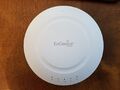 EAP1750H
-
 Front view
-
 Back view
-
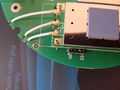 Serial pins


Categories:
- EnGenius
- Embedded system/access point
- Embedded System Qualcomm Atheros
- Embedded System QCA9558
- Qualcomm Atheros
- Embedded System MIPS 74Kc
- Embedded System
- Embedded System AR8035-A
- Embedded System Atheros
- Atheros
- Manuf Senao
- OpenWrt Supported
- Has Mimo Status
- Embedded System IEEE 802.11b/g/n
- Embedded System QCA9880
- Embedded System IEEE 802.11a/n/ac
- Dual-Radio Wireless Embedded System
- Wireless Embedded System
- Dual-Band
- English Documentation


