Hewlett Packard Enterprise 1920-8G-PoE+ (JG922A)
| HPE OfficeConnect 1920 8G PoE+ (180W) Switch | |
 | |
| WikiDevi.wi-cat.ru | Hewlett Packard Enterprise 1920-8G-PoE+ (JG922A) |
|---|---|
| 3rd Party Firmware | |
| dd-wrt | Status Unknown |
| OpenWrt | Partial Support |
| Tomato any flavor | Incompatible |
| Gargoyle | Status Unknown |
| Platform | |
| Brand • Model • Rev | HPE 1920-8G-PoE+ |
| Series | 1920 |
| Model part number | JG922A |
CPU1  | Realtek RTL8380M |
| CPU1 Type | MIPS 4KEc |
| CPU1 Speed | 500 MHz |
CPU2  | Nuvoton M0516LDE |
| CPU2 Speed | 50 MHz |
| Flash1 Chip | Macronix MX25L25635FMI-10G |
| Flash1 Size | 32 MiB 33,554,432 B <br />262,144 Kib <br />32,768 KiB <br />256 Mib <br />0.0313 GiB <br /> |
| Flash2 Chip | Nuvoton M0516LDE |
| Flash2 Size | 64 KiB 0.0625 MiB <br />65,536 B <br />512 Kib <br />0.5 Mib <br />6.103516e-5 GiB <br /> |
| RAM1 Size | 128 MiB 134,217,728 B <br />1,048,576 Kib <br />131,072 KiB <br />1,024 Mib <br />0.125 GiB <br /> |
| RAM1 Chip | SK hynix H5TQ1G83EFR-H9C |
| RAM2 Size | 4 KiB 0.00391 MiB <br />4,096 B <br />32 Kib <br />0.0313 Mib <br />3.814697e-6 GiB <br /> |
| RAM2 Chip | Nuvoton M0516LDE |
| ETH chip1 | Realtek RTL8380M |
| Switch | Realtek RTL8380M |
| Ethernet Port Count | 8-1GbE |
| Ethernet connector | 8P8C |
| Wired Standard | IEEE 802.3i/3u/3ab |
| Auto-MDIX | supported |
| Jumbo frame | yes |
| Switch Class | smart |
|
Ethernet OUI: 5C:8A:38 | |
| Expansion IF types | SFP |
| SFP ports | 2 |
| PoE | 802.3at, 802.3af, standard |
| Power | 100-240 VAC ~ 50/60 Hz, 3.3 A |
| Connector type | C13 |
| Serial Port (UART) | yes, RJ45 console, 15V TTL, (38400 8N1) |
| Other | |
|
Default IP address: see device label | |
| Manuf/OEM/ODM | H3C 1920-8G-POE+ VER.A |
|
Flags: Smart switch, PoE+ switch, LACP, SNMP, MSTP, RSTP, heatsink, fan, metal case | |
| 3rd Party Firmware Support |
OpenWrt • (List | Dev | DLs) |
|
Additional chips | |
| Retail | |
| Availability | End of Life |
| End of Life date | 2017 |
| ASIN |
B01MCVF7KB  |
| Country of manuf | China |
For a list of all currently documented Nuvoton MCU's with specifications, see Nuvoton.
For a list of all currently documented Realtek chipsets with specifications, see Realtek.
For a list of all currently documented HPE devices with specifications, see HPE.
Overview
- "H3C 1920-8G-POE+ VER.A" is silkscreened on the main board.
- "PSE BOARD_BCM59121_8 VER.A" is silkscreened on the PoE board.
- Switch (WEB-Managed, 8x 1GbE + 2x SFP ports, Fanless, Rack-mounting, 19")
H3C is a subsidiary of HP (which completed its acquisition with 3Com in April 2010)
Specifications
- Processor: Realtek RTL8380M Multi-Layer Managed Switch
- Controller with Embedded MIPS 4KEc @500MHz
- Co-processor: Nuvoton M0516LDE to manage PoE
- Flash/RAM: 32MB (SPI NOR) Flash, 128MB RAM (DDR3)
- LAN: 8x Gigabit (RJ45) 802.3at PoE Ethernet ports,
- SFP: 2x GbE SFP slots
- PoE: 802.3af (PoE), 802.3at (PoE+), 180W PoE budget
- 20Gbps switching capacity, Rack mountable (1U, 19")
Links of Interest
Flashing
 | NOTE: During configuration or flashing a device, the only things that should be hooked to the device is the computer and power. |
Flashing OpenWrt
Subtarget: rtl838x
Package architecture: mips_4kec
Supported Since Commit
Support started version: 23.05.0
Current supported version: 25.12.1
SFP partially supported
LAN Hardware: Realtek RTL8380M
WLAN Hardware: none
WLAN Comment: No WLAN
Installation method(s):
See devicepage, see git-commit
Install Comment:
https://forum.openwrt.org/t/support-for-rtl838x-based-managed-switches/57875/1544
Recovery method(s):
TFTP generic
Recovery Comment:
See installation commit message https://git.openwrt.org/?p=openwrt/openwrt.git;a=commit;h=b370753fc409eb2220af7caed9ffd66beed2d041
| git • >> |
|---|
realtek: add support for HPE 1920-8g-poe+
Hardware information:
---------------------

- RTL8380 SoC
- 8 Gigabit RJ45 PoE ports (built-in RTL8218B)
- 2 SFP ports (built-in SerDes)
- RJ45 RS232 port on front panel
- 32 MiB NOR Flash
- 128 MiB DDR3 DRAM
- PT7A7514 watchdog
- PoE chips: Nuvoton M0516LDE + BCM59121

Known issues:
---------------------
- PoE LEDs are uncontrolled.

(Manual taken from f2f09bc00280)
Booting initramfs image:
------------------------

- Prepare a FTP or TFTP server serving the OpenWrt initramfs image and
  connect the server to a switch port.

- Connect to the console port of the device and enter the extended
  boot menu by typing Ctrl+B when prompted.

- Choose the menu option "<3> Enter Ethernet SubMenu".

- Set network parameters via the option "<5> Modify Ethernet Parameter".
  Enter the FTP/TFTP filename as "Load File Name" ("Target File Name"
  can be left blank, it is not required for booting from RAM). Note that
  the configuration is saved on flash, so it only needs to be done once.

- Select "<1> Download Application Program To SDRAM And Run".

Initial installation:
---------------------

- Boot an initramfs image as described above, then use sysupgrade to
  install OpenWrt permanently. After initial installation, the
  bootloader needs to be configured to load the correct image file

- Enter the extended boot menu again and choose "<4> File Control",
  then select "<2> Set Application File type".

- Enter the number of the file "openwrt-kernel.bin" (should be 1), and
  use the option "<1> +Main" to select it as boot image.

- Choose "<0> Exit To Main Menu" and then "<1> Boot System".

NOTE: The bootloader on these devices can only boot from the VFS
filesystem which normally spans most of the flash. With OpenWrt, only
the first part of the firmware partition contains a valid filesystem,
the rest is used for rootfs. As the bootloader does not know about this,
you must not do any file operations in the bootloader, as this may
corrupt the OpenWrt installation (selecting the boot image is an
exception, as it only stores a flag in the bootloader data, but doesn't
write to the filesystem).

Example PoE config file (/etc/config/poe):
---------------------
config global
        option budget   '180'

config port
        option enable   '1'
        option id       '1'
        option name     'lan8'
        option poe_plus '1'
        option priority '2'
config port
        option enable   '1'
        option id       '2'
        option name     'lan7'
        option poe_plus '1'
        option priority '2'
config port
        option enable   '1'
        option id       '3'
        option name     'lan6'
        option poe_plus '1'
        option priority '2'
config port
        option enable   '1'
        option id       '4'
        option name     'lan5'
        option poe_plus '1'
        option priority '2'
config port
        option enable   '1'
        option id       '5'
        option name     'lan4'
        option poe_plus '1'
        option priority '2'
config port
        option enable   '1'
        option id       '6'
        option name     'lan3'
        option poe_plus '1'
        option priority '2'
config port
        option enable   '1'
        option id       '7'
        option name     'lan2'
        option poe_plus '1'
        option priority '2'
config port
        option enable   '1'
        option id       '8'
        option name     'lan1'
        option poe_plus '1'
        option priority '2'
|
Pictures
-
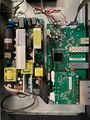 Internal view
 -
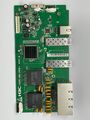 Main board top
 -
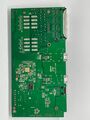 Main board bottom
 -
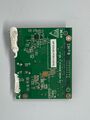 PoE board top
 -
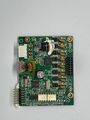 PoE board bottom
_-_Internal.jpeg)
_-_Top.jpeg)
_-_Bottom.jpeg)
_-_PoE_Top.jpeg)
_-_PoE_Bottom.jpeg)
See also
- Hewlett Packard Enterprise 1920-8G (JG920A)
- Hewlett Packard Enterprise 1920-8G-PoE+ (JG921A)
- Hewlett Packard Enterprise 1920-8G-PoE+ (JG922A)
- Hewlett Packard Enterprise 1920-16G (JG923A)
- Hewlett Packard Enterprise 1920-24G (JG924A)
- Hewlett Packard Enterprise 1920-24G-PoE+ (JG925A)
- Hewlett Packard Enterprise 1920-24G-PoE+ (JG926A)
- Hewlett Packard Enterprise 1920-48G (JG927A)
- Hewlett Packard Enterprise 1920-48G-PoE+ (JG928A)
Models
Model 		Hewlett Packard 	Switch

HP 1920-8G		JG920A	 	Switch (8x 1GbE, fanless)
HP 1920-8G-PoE+		JG921A	 	Switch (8x 1GbE, 65W PoE+)
HP 1920-8G-PoE+		JG922A	 	Switch (8x 1GbE, 180W PoE+)
HP 1920-16G		JG923A	 	Switch (16x 1GbE)
HP 1920-24G		JG924A	 	Switch (24x 1GbE)
HP 1920-24G-PoE+	JG925A	 	Switch (24x 1GbE, 2x SFP, 180W PoE+)
HP 1920-24G-PoE+	JG926A	 	Switch (24x 1GbE, 2x SFP, 370W PoE+)
HP 1920-48G		JG927A	 	Switch (48x 1GbE, 4x SFP)
HP 1920-48G-PoE+	JG928A	 	Switch (48x 1GbE, 4x SFP, 370W PoE++)

HPE 1920S-8G		JL380A	 	Switch (8x 1GbE, fanless)
HPE 1920S-8G-PoE+	JL383A	 	Switch (8x 1GbE, 65W PoE+, fanless)
HPE 1920S-24G		JL381A	 	Switch (24x 1GbE, 2x SFP)
HPE 1920S-24G		JL382A	 	Switch (24x 1GbE, 2x SFP)
HPE 1920S-24G-PoE+	JL384A	 	Switch (24x 1GbE, 2x SFP, 185W PoE+)
HPE 1920S-24G-PoE+	JL385A	 	Switch (24x 1GbE, 2x SFP, 370W PoE+)
HPE 1920S-48G-PoE+	JL386A	 	Switch (48x 1GbE, 4x SFP, 370W PoE+)


