Sophos RED 15w rev 1
From TechInfoDepot
Jump to navigationJump to search
| abgn (AN600) | |||||||||||||||||||||
|---|---|---|---|---|---|---|---|---|---|---|---|---|---|---|---|---|---|---|---|---|---|
| Sophos RED 15w | |||||||||||||||||||||
 | |||||||||||||||||||||
| WikiDevi.wi-cat.ru | Sophos RED 15w Rev 1 | ||||||||||||||||||||
| 3rd Party Firmware | |||||||||||||||||||||
| dd-wrt | Status Unknown | ||||||||||||||||||||
| OpenWrt | Supported | ||||||||||||||||||||
| Tomato any flavor | Incompatible | ||||||||||||||||||||
| Gargoyle | Status Unknown | ||||||||||||||||||||
| Platform | |||||||||||||||||||||
| Brand • Model • Rev | Sophos RED 15w Rev. 1 | ||||||||||||||||||||
| FCC ID | RYK-WPEA-121N | ||||||||||||||||||||
| IC ID | 6158A-WPEA121NW | ||||||||||||||||||||
| Board ID | 4BQ00REDD1X10 | ||||||||||||||||||||
| Type | security appliance | ||||||||||||||||||||
CPU1  | Freescale (NXP) P1010 | ||||||||||||||||||||
| CPU1 Type | Power QorIQ | ||||||||||||||||||||
| CPU1 Speed | 533 MHz | ||||||||||||||||||||
| Flash1 Chip | Macronix MX30LF1G18AC-TI | ||||||||||||||||||||
| Flash1 Size | 128 MiB 134,217,728 B <br />1,048,576 Kib <br />131,072 KiB <br />1,024 Mib <br />0.125 GiB <br /> (NAND) | ||||||||||||||||||||
| RAM1 Size | 128 MiB 134,217,728 B <br />1,048,576 Kib <br />131,072 KiB <br />1,024 Mib <br />0.125 GiB <br /> (DDR3 SDRAM) | ||||||||||||||||||||
| RAM1 Chip | Samsung K4B1G1646I-BCMA | ||||||||||||||||||||
| ETH chip1 | Freescale (NXP) P1010 | ||||||||||||||||||||
| ETH chip2 | Realtek RTL8211FS | ||||||||||||||||||||
| Switch | Realtek RTL8367RB | ||||||||||||||||||||
| Ethernet Port Count |
1-1GbE-WAN 4-1GbE-LAN | ||||||||||||||||||||
| Wired Standard | IEEE 802.3i/3u/3ab | ||||||||||||||||||||
| Stock bootloader | U-Boot 1.0.10 QorIQ-SKD-V1.6 | ||||||||||||||||||||
| Stock FW OS | Linux 3.10.49 OpenWrt Barrier Breaker | ||||||||||||||||||||
| Expansion IF types | Mini PCIe, USB 2.0 | ||||||||||||||||||||
| Mini PCIe slots | 1 | ||||||||||||||||||||
| USB ports | 1 | ||||||||||||||||||||
| USB Hub Compatible | Untested | ||||||||||||||||||||
| Power | 12 VDC, 1.5 A | ||||||||||||||||||||
| Connector type |
barrel 5.5 mm (OD) 2.1 mm (ID) 9.5 mm (LEN) | ||||||||||||||||||||
| Serial Port (UART) | yes, console port, RJ45, (115200 8N1) | ||||||||||||||||||||
|
Flags: | |||||||||||||||||||||
|
Additional chips | |||||||||||||||||||||
| Other | |||||||||||||||||||||
|
| |||||||||||||||||||||
| 3rd Party Firmware Support |
OpenWrt • (List | Dev | DLs) | ||||||||||||||||||||
| Retail | |||||||||||||||||||||
| Availability | End of Life | ||||||||||||||||||||
| End of Life date | 31 August 2023 | ||||||||||||||||||||
| (Est.) release date | March 2016 | ||||||||||||||||||||
| Country of manuf | Taiwan | ||||||||||||||||||||
| Radio 1 | |||||||||||||||||||||
| Radio1 module | SparkLAN WPEA-121N | ||||||||||||||||||||
| Radio1 module IF | Mini PCIe (half) | ||||||||||||||||||||
| Chip1 | Atheros AR9382 | ||||||||||||||||||||
| Wireless interface OUI | 00:1A:8C | ||||||||||||||||||||
| Antenna Connector Type | U.FL, RP-SMA | ||||||||||||||||||||
| MIMO status | 2x2:2 | ||||||||||||||||||||
| Wireless Standard | IEEE 802.11a/b/g/n | ||||||||||||||||||||
| 802.11n | up to 300/3.. Mbps | ||||||||||||||||||||
| 802.11g | up to 54 Mbps | ||||||||||||||||||||
| 802.11b | up to 11 Mbps | ||||||||||||||||||||
| 802.11a | up to 54 Mbps | ||||||||||||||||||||
| WiFi Operating Frequency | 2.4 or 5 GHz | ||||||||||||||||||||
| |||||||||||||||||||||
| |||||||||||||||||||||
For a list of all currently documented Atheros (QCA) chipsets with specifications, see Atheros.
For a list of all currently documented Freescale (NXP) SoC's with specifications, see Freescale.
For a list of all currently documented Realtek chipsets with specifications, see Realtek.
For a list of all currently documented Sophos devices with specifications, see Sophos.
Overview
"RED15 VER:D", "4BQ00REDD1X10" and "MADE IN TAIWAN" are silkscreened on both sides of the board.
Hardware specification
- CPU: Freescale P1011 PowerPC (@533MHz)
- Memory: 128MB (SDRAM) DDR3
- Storage: 128MB NAND Flash
- Network: 5x Gigabit Ethernet ports
- WiFi: Atheros AR9382 (802.11abgn)
- USB: 1x USB 2.0 ports
- Power: 12V, 1.5A via barrel
Links of Interest
Flashing
 | NOTE: During configuration or flashing a device, the only things that should be hooked to the device is the computer and power. |
Flashing OpenWrt
Target: mpc85xx
Subtarget: p1010
Package architecture: powerpc_8548
Supported Since Commit
Support started version: 19.07.0
Current supported version: 25.12.4
Subtarget: p1010
Package architecture: powerpc_8548
Supported Since Commit
Support started version: 19.07.0
Current supported version: 25.12.4
LAN Hardware: Realtek RTL8367RB
WLAN Hardware: SparkLan WPEA-121N, Atheros AR9382
Installation method(s):
see git-commit
Recovery method(s):
see git-commit
WLAN Hardware: SparkLan WPEA-121N, Atheros AR9382
Installation method(s):
see git-commit
Recovery method(s):
see git-commit
| git • >> |
|---|
mpc85xx: add support for Sophos RED 15w Rev.1
Hardware
========
CPU:  Freescale P1010 PowerPC
RAM:  128M DDR3
NAND: 128MiB
ETH:  RTL8211F SGMII PHY
      RTL8367B 5-port RGMII switch
      (not connected to SoC - unmanaged)
WiFi: SparkLan WPEA-121N
       - Atheros AR9382 2T2R abgn
USB:  1x USB 2.0
LED:  System, Router, Internet, Tunnel controllable
      LAN1-4, WAN, Power non-controllable
BTN:  None

Installation
============
1. Power on the device while attached to the Console port.

2. Halt the U-Boot by pressing Enter when prompted.

3. Set the correct bootcmd for booting OpenWRT:
 > setenv bootargs_owrt "setenv bootargs console=ttyS0,115200"
 > setenv bootcmd "run bootargs_owrt;
   nand read 0x1000000 0x300000 0x800000;
   bootm 0x1000000;"
 > saveenv

5. Rename OpenWRT initramfs image to 'kernel.bin' and place it in a
   TFTP server root-directory served on 192.168.1.2/24. Connect your
   computer to one of the LAN-ports.

4. Boot OpenWRT initramfs image with
 > run bootargs_owrt; tftpboot 0x1000000 192.168.1.2:kernel.bin;
   bootm 0x1000000;

6. (Optional)
   Make a Backup of 'sophos-os1', 'sophos-os2' and 'sophos-data' in case
   you ever want to go back to the vendor firmware.

7. Create Ubi Volume on mtd4 by executing
 > ubiformat /dev/mtd4 -y

8. Transfer OpenWRT sysupgrade image to the device via SCP and install it
   with
 > sysupgrade -n <openwrt-image-file>

Back to Stock
=============
If you want to go back to the stock firmware, here is the bootcmd of the
vendor firmware:
 > setenv bootargs console=ttyS0,115200 root=/dev/mtdblock5;
   nand read 0xc00000 0x00300000  0x100000;
   nand read 0x1000000 0x00400000 0x00800000;
   bootm 0x1000000 - 0xc00000

Set it via 'setenv' from the U-Boot shell and don't forget to save it
using 'saveenv'!

After this, boot the OpenWRT initramfs image just like you would for
installation. Write back the three vendor partitions using mtd. Reboot
the device afterwards.

Signed-off-by: David Bauer
[refresh and reorder patches]
Signed-off-by: Christian Lamparter
|
Pictures
-
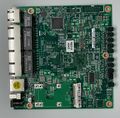 Board Top
 -
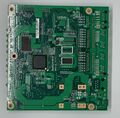 Board Bottom
 -
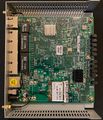 Internal view


Categories:
- Sophos
- Embedded system/security appliance
- Embedded System Freescale (NXP)
- Embedded System P1010
- Freescale (NXP)
- Embedded System Power
- Embedded System QorIQ
- Embedded System RTL8211FS
- Embedded System Realtek
- Realtek
- Embedded System RTL8367RB
- OpenWrt Supported
- Embedded System Atheros
- Embedded System AR9382
- Atheros
- Has Mimo Status
- Embedded System IEEE 802.11a/b/g/n
- Single-Radio Wireless Embedded System
- Wireless Embedded System
- Dual-Band
- Embedded System
- English Documentation


