ZyXEL GS1900-16
From TechInfoDepot
Jump to navigationJump to search
| 16-Port Gigabit Ethernet Smart Managed Switch | ||||||||||||||||||||||||||||||||||||||||
 | ||||||||||||||||||||||||||||||||||||||||
| Homepage | Product page | |||||||||||||||||||||||||||||||||||||||
|---|---|---|---|---|---|---|---|---|---|---|---|---|---|---|---|---|---|---|---|---|---|---|---|---|---|---|---|---|---|---|---|---|---|---|---|---|---|---|---|---|
| WikiDevi.wi-cat.ru | ZyXEL GS1900-16 | |||||||||||||||||||||||||||||||||||||||
| 3rd Party Firmware | ||||||||||||||||||||||||||||||||||||||||
| dd-wrt | Status Unknown | |||||||||||||||||||||||||||||||||||||||
| OpenWrt | Supported | |||||||||||||||||||||||||||||||||||||||
| Tomato any flavor | Incompatible | |||||||||||||||||||||||||||||||||||||||
| Gargoyle | Status Unknown | |||||||||||||||||||||||||||||||||||||||
| Platform | ||||||||||||||||||||||||||||||||||||||||
| Brand • Model • Rev | ZyXEL GS1900-16 rev A1 | |||||||||||||||||||||||||||||||||||||||
CPU1  | Realtek RTL8382M | |||||||||||||||||||||||||||||||||||||||
| CPU1 Type | MIPS 4KEc | |||||||||||||||||||||||||||||||||||||||
| CPU1 Speed | 500 MHz | |||||||||||||||||||||||||||||||||||||||
| Flash1 Chip | Macronix MX25L12835FM2I-10G | |||||||||||||||||||||||||||||||||||||||
| Flash1 Size | 16 MiB 16,777,216 B <br />131,072 Kib <br />16,384 KiB <br />128 Mib <br />0.0156 GiB <br /> | |||||||||||||||||||||||||||||||||||||||
| RAM1 Size | 128 MiB 134,217,728 B <br />1,048,576 Kib <br />131,072 KiB <br />1,024 Mib <br />0.125 GiB <br /> (DDR2) | |||||||||||||||||||||||||||||||||||||||
| RAM1 Chip | Nanya NT5TU128M8HE-AC | |||||||||||||||||||||||||||||||||||||||
| ETH chip1 | Realtek RTL8382M | |||||||||||||||||||||||||||||||||||||||
| ETH chip2 | Realtek RTL8218B | |||||||||||||||||||||||||||||||||||||||
| Switch | Realtek RTL8382M | |||||||||||||||||||||||||||||||||||||||
| Ethernet Port Count | 16-1GbE | |||||||||||||||||||||||||||||||||||||||
| Ethernet connector | 8P8C | |||||||||||||||||||||||||||||||||||||||
| Wired Standard | IEEE 802.3i/3u/3ab | |||||||||||||||||||||||||||||||||||||||
| Auto-MDIX | supported | |||||||||||||||||||||||||||||||||||||||
| Jumbo frame | yes | |||||||||||||||||||||||||||||||||||||||
| Switch Class | managed | |||||||||||||||||||||||||||||||||||||||
| Expansion IF types | none specified | |||||||||||||||||||||||||||||||||||||||
| Stock bootloader | U-Boot 2011.12 2.0.0.59413 | |||||||||||||||||||||||||||||||||||||||
| Stock FW OS | ucLinux 2.6.19 | |||||||||||||||||||||||||||||||||||||||
| Power | 100-240 VAC ~ 50/60 Hz, 0.25 A | |||||||||||||||||||||||||||||||||||||||
| Connector type | IEC 60320 C14 | |||||||||||||||||||||||||||||||||||||||
| Serial Port (UART) | yes, 4-pin header, populated, J12, 3.3V TTL, (115200 8N1) | |||||||||||||||||||||||||||||||||||||||
| JTAG Port | yes, 20-pin header, unpopulated, J11 | |||||||||||||||||||||||||||||||||||||||
| Other | ||||||||||||||||||||||||||||||||||||||||
|
Default IP address: 192.168.1.1 | ||||||||||||||||||||||||||||||||||||||||
|
Flags: Smart switch, LACP, SNMP, MSTP, RSTP, metal case, heatsink | ||||||||||||||||||||||||||||||||||||||||
| 3rd Party Firmware Support |
OpenWrt • (List | Dev | DLs) | |||||||||||||||||||||||||||||||||||||||
|
Additional chips | ||||||||||||||||||||||||||||||||||||||||
| Retail | ||||||||||||||||||||||||||||||||||||||||
| (Est.) release date | 24 July 2013 | |||||||||||||||||||||||||||||||||||||||
| Newegg | N82E16833181322 | |||||||||||||||||||||||||||||||||||||||
| UPC |
760559121006 (UPC DB, On eBay) | |||||||||||||||||||||||||||||||||||||||
| EAN |
0760559121006 (UPC DB, On eBay) | |||||||||||||||||||||||||||||||||||||||
| ASIN |
B00H1OM0BA  | |||||||||||||||||||||||||||||||||||||||
| Country of manuf | China | |||||||||||||||||||||||||||||||||||||||
| ||||||||||||||||||||||||||||||||||||||||
For a list of all currently documented Realtek chipsets with specifications, see Realtek.
For a list of all currently documented ZyXEL devices with specifications, see ZyXEL.
Overview
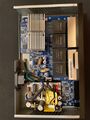
- "37ZY-G716D0.413 V1.3" is silkscreened on board.
Specifications
- Processor: Realtek RTL8382M Multi-Layer Managed Switch
- Controller with Embedded MIPS 4KEc @500MHz
- Flash/RAM: 16MB (SPI NOR) Flash, 128MB RAM (DDR2)
- 16x Gigabit Ethernet ports
- 32Gbps switching capacity
Links of Interest
Reviews
Miscellaneous
- On Enkosp (RU)
Flashing
 | NOTE: During configuration or flashing a device, the only things that should be hooked to the device is the computer and power. |
Flashing OpenWrt
Target: realtek
Subtarget: rtl838x
Package architecture: mips_4kec
Supported Since Commit
Support started version: 22.03.0
Current supported version: 25.12.1
Subtarget: rtl838x
Package architecture: mips_4kec
Supported Since Commit
Support started version: 22.03.0
Current supported version: 25.12.1
LAN Hardware: Realtek RTL8382M
WLAN Hardware: none
Installation method(s):
GUI OEM, U-Boot TFTP + serial recovery, see git-commit
Recovery method(s):
U-Boot TFTP + serial recovery, see git-commit
WLAN Hardware: none
Installation method(s):
GUI OEM, U-Boot TFTP + serial recovery, see git-commit
Recovery method(s):
U-Boot TFTP + serial recovery, see git-commit
| git • >> |
|---|
realtek: add support for ZyXEL GS1900-16
The ZyXEL GS1900-16 is a 16 port gigabit switch similar to other GS1900 switches.

Specifications
--------------
* Device:    ZyXEL GS1900-16
* SoC:       Realtek RTL8382M 500 MHz MIPS 4KEc
* Flash:     16 MiB Macronix MX25L12835F
* RAM:       128 MiB DDR2 SDRAM Nanya NT5TU128M8HE
* Ethernet:  16x 10/100/1000 Mbps
* LEDs:      1 PWR LED (green, not configurable)
             1 SYS LED (green, configurable)
             16 ethernet port link/activity LEDs (green, SoC controlled)
* Buttons:   1 "RESET" button on front panel
* Power      120-240V AC C13
* UART:      1 serial header (J12) with populated standard pin connector on
             the right back of the PCB.
             Pinout (front to back):
             + Pin 1 - VCC marked with white dot
             + Pin 2 - RX
             + Pin 3 - TX
             + PIn 4 - GND

Serial connection parameters:  115200 8N1.

Installation
------------

OEM upgrade method:

* Log in to OEM management web interface
* Navigate to Maintenance > Firmware
* Select the HTTP radio button
* Select the Active radio button
* Use the browse button to locate the
realtek-generic-zyxel_gs1900-16-initramfs-kernel.bin
file amd select open so File Path is update with filename.
* Select the Apply button. Screen will display "Prepare
for firmware upgrade ...".
*Wait until screen shows "Do you really want to reboot?"
then select the OK button
* Once OpenWrt has booted, scp the sysupgrade image to /tmp and flash it:
   > sysupgrade -n /tmp/realtek-generic-zyxel_gs1900-16-squashfs-sysupgrade.bin
   it may be necessary to restart the network (/etc/init.d/network restart) on
   the running initramfs image.

U-Boot TFTP method:

* Configure your client with a static 192.168.1.x IP (e.g. 192.168.1.10).
* Set up a TFTP server on your client and make it serve the initramfs image.
* Connect serial, power up the switch, interrupt U-boot by hitting the
  space bar, and enable the network:
   > rtk network on
* Since the GS1900-16 is a dual-partition device, you want to keep the OEM
  firmware on the backup partition for the time being. OpenWrt can only boot
  from the first partition anyway (hardcoded in the DTS). To make sure we are
  manipulating the first partition, issue the following commands:
  > setsys bootpartition 0
  > savesys
* Download the image onto the device and boot from it:
   > tftpboot 0x84f00000 192.168.1.10:openwrt-realtek-generic-zyxel_gs1900-16-initramfs-kernel.bin
   > bootm
* Once OpenWrt has booted, scp the sysupgrade image to /tmp and flash it:
   > sysupgrade -n /tmp/openwrt-realtek-generic-zyxel_gs1900-16-squashfs-sysupgrade.bin
   it may be necessary to restart the network (/etc/init.d/network restart) on
   the running initramfs image.
|
-
 internal


