D-Link DGS-1210-26 rev F1
| 26-Port Gigabit Smart Managed Switch | |
 | |
| Homepage | Product page |
|---|---|
| 3rd Party Firmware | |
| dd-wrt | Status Unknown |
| OpenWrt | Supported |
| Tomato any flavor | Incompatible |
| Gargoyle | Status Unknown |
| Platform | |
| Brand • Model • Rev | D-Link DGS-1210-26 rev F1 |
CPU1  | Realtek RTL8382M |
| CPU1 Type | MIPS 4KEc |
| CPU1 Speed | 500 MHz |
| Flash1 Chip | Macronix MX25L25635FMI-10G |
| Flash1 Size | 32 MiB 33,554,432 B <br />262,144 Kib <br />32,768 KiB <br />256 Mib <br />0.0313 GiB <br /> (NOR) |
| RAM1 Size | 128 MiB 134,217,728 B <br />1,048,576 Kib <br />131,072 KiB <br />1,024 Mib <br />0.125 GiB <br /> |
| RAM1 Chip | Nanya NT5CC128M8GN-DI |
| ETH chip1 | Realtek RTL8382M |
| ETH chip2 | Realtek RTL8218B |
| ETH chip3 | Realtek RTL8218B |
| Switch | Realtek RTL8382M |
| Ethernet Port Count | 24-1GbE |
| Ethernet connector | 8P8C |
| Wired Standard | IEEE 802.3i/3u/3ab |
| Auto-MDIX | supported |
| Jumbo frame | yes |
| Switch Class | smart |
|
Ethernet OUI: 78:32:1B | |
| Expansion IF types | SFP |
| SFP ports | 2 |
| Stock bootloader | U-Boot 2011.12 2.1.5.67086 |
| Stock FW OS | ucLinux 2.6.19 |
| Power | 100-240 VAC ~ 50/60 Hz, 0.4 A |
| Connector type | C13 |
| Serial Port (UART) | yes, 4-pin header, unpopulated, J6, 3.3V TTL, (115200 8N1) |
| JTAG Port | yes, 14-pin header, unpopulated, J5 |
| Other | |
|
Default IP address: 10.90.90.90 | |
| Manuf/OEM/ODM | Cameo |
|
Flags: Smart switch, SFP ports, LACP, SNMP, MSTP, RSTP, heatsink, metal case | |
| 3rd Party Firmware Support |
OpenWrt • (List | Dev | DLs) |
|
Additional chips | |
| Retail | |
| Newegg | 9SIAA9UK8H3694 |
| ASIN |
B074B3NDTZ  |
| Country of manuf | China |
For a list of all currently documented Realtek chipsets with specifications, see Realtek.
For a list of all currently documented D-Link devices with specifications, see D-Link.
Overview
Specifications
- Processor: Realtek RTL8382M Multi-Layer Managed
- Switch Controller w/ Embedded MIPS 4KEc @500MHz
- Flash/RAM: 32MB (SPI NOR) Flash, 128MB (DDR3) RAM
- LAN: 24x Gigabit Ethernet (RJ45) ports,
- 2x GbE SFP slots, 52Gbps switching capacity
- Rack mountable (1U, 19")
Links of Interest
Revision	Port variants			Hardware platform

A1		10P, 16, 24, 48			Marvell
B1		10P, 20, 28(P), 52		Marvell
C1		10(P), 20, 28(P), 52(P/MP)	Broadcom
D1		8(P), 16, 24(P), 48		Broadcom
F1		10(P/MP), 26, 28(P/MP), 52(MP)	Realtek RTL838x
G1		8P, 10, 16, 24(P), 48		Realtek RTL838x
R1		10(P/MP),26,28(P/MP),52(MP/MPP)	Realtek RTL838x
Flashing
 | NOTE: During configuration or flashing a device, the only things that should be hooked to the device is the computer and power. |
Flashing OpenWrt
Subtarget: rtl838x
Package architecture: mips_4kec
Supported Since Commit
Support started version: 25.12.0
Current supported version: 25.12.1
WLAN Comment: No WLAN
Installation method(s):
see git-commit
Recovery method(s):
see git-commit
| git • >> |
|---|
realtek: add support for D-Link DGS-1210-26
This patch adds support for D-Link DGS-1210-26 rev. F1

Hardware specification
----------------------

* RTL8382M SoC, 1 MIPS 4KEc core @ 500MHz
* 128MB DRAM
* 32MB NOR Flash (MX25L25635E)
* 24 x 10/100/1000BASE-T ports
* 2 x SFP ports
* Power LED
* Reset button on front panel

Installation using OEM webinterface
-----------------------------------

1. Make sure you are running OEM firmware from secondary slot. If not, switch to image2 using the menus
     System > Firmware Information > Boot from image2
     Tools > reboot
2. Upload image squashfs-factory_image1.bin via Tools > Backup / Upgrade Firmware > image1
3. Toggle startup image via System > Firmware Information > Boot from image1
4. Tools > reboot

Known working firmware version for this procedure: 6.20.007

Installation using TFTP and serial console
------------------------------------------

1. Prepare a TFTP server with the OpenWrt *initramfs-kernel.bin and assign it an IP from 10.90.90.0/24 (except 10.90.90.90)
2. Connect the TFTP server to one of switch's ports
3. Connect to the serial console (115200 baud) and power on the switch
4. Press the ESC key once you see "Hit Esc key to stop autoboot" in the console output
5. Press CTRL+C keys to get into the real U-Boot prompt
6. Init the network with the command "rtk network on"
7. Load the OpenWrt image with the command "tftpboot 0x8f000000 <TFTP_SERVER_IP>:<IMAGE_FILE>"
   (<TFTP_SERVER_IP> is the TFTP server's IP, e.g. 10.90.90.100; <IMAGE_FILE> is the name of the image provided by the TFTP server)
8. Boot the OpenWrt image with the command "bootm"
9. Browse to https://192.168.1.1/cgi-bin/luci/admin/system/flash
10. Upload the the OpenWrt *squashfs-sysupgrade.bin to the switch
11. Wait for it to reboot
|
Pictures
-
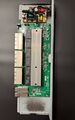 PCB, PSU
 -
 Board Top
 -
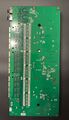 Board Bottom


See also
Models
- D-Link DGS series • DSG-1210 series (SH) • DGS-1210 series (ToH)
- D-Link DGS-1210-10P rev A1 • Marvell 98DX3005
- D-Link DGS-1210-10P rev B1 • Marvell 98DX3053
- D-Link DGS-1210-10 rev F1 • Realtek RTL8380M (Spec.)
- D-Link DGS-1210-10P rev F1 • Realtek RTL8380M (Spec.) • Datasheet
- D-Link DGS-1210-10P rev R1 • Realtek RTL8380M • Datasheet
- D-Link DGS-1210-16 rev A1 • Marvell 98DX3015
- D-Link DGS-1210-16 rev G1 • Realtek RTL8382M (Spec.)
- D-Link DGS-1210-20 rev B1 • Marvell 98DX3054
- D-Link DGS-1210-24 rev A1 • Marvell 98DX3025
- D-Link DGS-1210-26 rev F1 • Realtek RTL8382M
- D-Link DGS-1210-28 rev F1 • Realtek RTL8382M (Spec.)
- D-Link DGS-1210-28P rev F1 • Realtek RTL8382M (Spec.)
- D-Link DGS-1210-28MP rev F1 • Realtek RTL8382M


