Cudy TR1200 v1
From TechInfoDepot
Jump to navigationJump to search
| abgn+ac (AC1200) | |||||||||||||
|---|---|---|---|---|---|---|---|---|---|---|---|---|---|
|
AC1200 Pocket-Sized Wi-Fi Travel Router Wireless Mini VPN Router | |||||||||||||
 | |||||||||||||
| Homepage | Product page | ||||||||||||
| WikiDevi.wi-cat.ru | Cudy TR1200 | ||||||||||||
| 3rd Party Firmware | |||||||||||||
| dd-wrt | Status Unknown | ||||||||||||
| OpenWrt | Partial Support | ||||||||||||
| Tomato any flavor | Incompatible | ||||||||||||
| Gargoyle | Status Unknown | ||||||||||||
| Platform | |||||||||||||
| Brand • Model • Rev | Cudy TR1200 Rev 1.1 | ||||||||||||
| Serial number prefix | TR1200 | ||||||||||||
| FCC ID | 2APRGRT02 | ||||||||||||
| Board ID | 300100154 | ||||||||||||
| Type | VPN Router, travel router, wireless router | ||||||||||||
CPU1  | MediaTek MT7628AN | ||||||||||||
| CPU1 Type | MIPS 24KEc | ||||||||||||
| CPU1 Speed | 580 MHz | ||||||||||||
| Flash1 Chip | XMC 25QH128CH10 | ||||||||||||
| Flash1 Size | 16 MiB 16,777,216 B <br />131,072 Kib <br />16,384 KiB <br />128 Mib <br />0.0156 GiB <br /> | ||||||||||||
| RAM1 Size | 128 MiB 134,217,728 B <br />1,048,576 Kib <br />131,072 KiB <br />1,024 Mib <br />0.125 GiB <br /> | ||||||||||||
| RAM1 Chip | ESMT M14D1G1664A | ||||||||||||
| ETH chip1 | MediaTek MT7628AN | ||||||||||||
| Switch | MediaTek MT7628AN | ||||||||||||
| Ethernet Port Count |
1-100MbE-WAN 1-100MbE-LAN | ||||||||||||
| Wired Standard | IEEE 802.3i/3u | ||||||||||||
| Stock bootloader | U-Boot 1.1.3 | ||||||||||||
| Stock FW OS | Linux 4.4.140 | ||||||||||||
| Expansion IF types | USB 2.0 | ||||||||||||
| USB ports | 1 | ||||||||||||
| USB Hub Compatible | Untested | ||||||||||||
| Power | 5 VDC, 2 A | ||||||||||||
| Connector type | USB Female (Type-C) | ||||||||||||
| Serial Port (UART) | yes, 4-pin header, unpopulated, J1 (PGRT), 3.3V TTL, (115200 8N1) | ||||||||||||
| JTAG Port | no | ||||||||||||
|
| |||||||||||||
|
| |||||||||||||
| Other | |||||||||||||
|
Default SSID: Cudy-XXXX (15 addl. devices) | |||||||||||||
| 3rd Party Firmware Support |
OpenWrt • (List | Dev | DLs) | ||||||||||||
| Retail | |||||||||||||
| (Est.) release date | March 2023 | ||||||||||||
| EAN |
6971690793074 (UPC DB, On eBay) | ||||||||||||
| ASIN |
B0BXN86Q7Q  | ||||||||||||
| Country of manuf | China | ||||||||||||
| Radio 1 | |||||||||||||
| Chip1 | MediaTek MT7628AN | ||||||||||||
| Wireless interface OUI | 80:AF:CA | ||||||||||||
| Antenna Connector Type | U.FL | ||||||||||||
| MIMO status | 2x2:2 | ||||||||||||
| Wireless Standard | IEEE 802.11b/g/n | ||||||||||||
| 802.11n | up to 300 Mbps | ||||||||||||
| 802.11g | up to 54 Mbps | ||||||||||||
| 802.11b | up to 11 Mbps | ||||||||||||
| WiFi Operating Frequency | 2.4 GHz | ||||||||||||
| Radio 2 | |||||||||||||
| Chip1 | MediaTek MT7613BEN | ||||||||||||
| Wireless interface OUI | 80:AF:CA | ||||||||||||
| Antenna Connector Type | U.FL | ||||||||||||
| MIMO status | 2x2:2 | ||||||||||||
| Wireless Standard | IEEE 802.11a/n/ac | ||||||||||||
| 802.11ac | up to 867 Mbps | ||||||||||||
| 802.11n | up to 300 Mbps | ||||||||||||
| 802.11a | up to 54 Mbps | ||||||||||||
| WiFi Operating Frequency | 5 GHz | ||||||||||||
| |||||||||||||
For a list of all currently documented MediaTek chipsets with specifications, see MediaTek.
For a list of all currently documented Cudy devices with specifications, see Cudy.
Overview
Hardware specification
- CPU: MediaTek MT7628AN @580MHz MIPS 24KEc
- Flash: 16MB (SPI NOR) @104MHz
- Memory: 128MB (DDR2) SDRAM
- Wi-Fi: MediaTek MT7628AN 802.11bgn (2.4GHz) 2x2
- MediaTek MT7613BEN 802.11an/ac (5GHz) 2×2
- Network: 2x FE (100M) ports; USB: 1x USB 2.0 port
- Power Source: 5V/2A via USB (Type-C) port
Flashing
 | NOTE: During configuration or flashing a device, the only things that should be hooked to the device is the computer and power. |
Flashing OpenWrt
Target: ramips
Subtarget: mt76x8
Package architecture: mipsel_24kc
Supported Since Commit
Support started version: 23.05.4
Current supported version: 25.12.2
Subtarget: mt76x8
Package architecture: mipsel_24kc
Supported Since Commit
Support started version: 23.05.4
Current supported version: 25.12.2
Unsupported Functions:
No DFS support
LAN Hardware: MediaTek MT7628AN
WLAN Hardware: MediaTek MT7628AN, MediaTek MT7613BEN
WLAN Comment: No DFS support
Installation method(s):
see devicepage, see git-commit
Install Comment:
Need a signed OpenWrt intermediary image from Cudy before installing official OpenWrt image.
Recovery method(s):
see devicepage, see git-commit
No DFS support
LAN Hardware: MediaTek MT7628AN
WLAN Hardware: MediaTek MT7628AN, MediaTek MT7613BEN
WLAN Comment: No DFS support
Installation method(s):
see devicepage, see git-commit
Install Comment:
Need a signed OpenWrt intermediary image from Cudy before installing official OpenWrt image.
Recovery method(s):
see devicepage, see git-commit
| git • >> |
|---|
ramips: mt76x8: add support for Cudy TR1200 v1 Hardware: - SoC: MediaTek MT7628AN (MIPS 580MHz) - Flash: 16 MiB XMC 25QH128CH10 - RAM: 128 MiB ESMT M14D1G1664A - WLAN: 2.4 GHz (MT7628), 5 GHz (MT7613BEN 802.11ac) - Ethernet: 1x 10/100 Mbps WAN, 1x 10/100 LAN (MT7628) - USB 2.0 port - Buttons: 1 Reset button, 1 slider button - LEDs: 1x Red, 1x White - Serial console: unpopulated header, 115200 8n1 - Power: 5 VDC, 2 A MAC addresses: +---------+-------------------+-----------+ | | MAC | Algorithm | +---------+-------------------+-----------+ | WAN | 80:af:ca:xx:xx:x0 | label | | LAN | 80:af:ca:xx:xx:x0 | label | | WLAN 2g | 80:af:ca:xx:xx:x0 | label | | WLAN 5g | 80:af:ca:xx:xx:x2 | label+2 | +---------+-------------------+-----------+ Installation: The installation must be done via TFTP by disassembling the router. On other occasions Cudy has distributed intermediate firmware to make installation easier, and so I recommend checking the Wiki for this device if there is a more convenient solution than the one below. To install using TFTP: 1. Upgrade to a beta firmware (signed by Cudy) that can be downloaded from the wiki. This is required in order to use an unlocked u-boot. 2. Connect to UART. 3. While the router is turning on, press 1. 4. Connect to LAN and set your IP to 192.168.1.88/24. Configure a TFTP server and an OpenWrt initramfs-kernel.bin firmware file as recovery.bin. 5. Press Enter three times. Verify the filename. 6. If you can reach LuCI or SSH now, just use the sysupgrade image with the 'Keep settings' option turned off. If you don't want to use the beta firmware nor the unlocked u-boot, you can install the firmware writing the sysupgrade image on the firmware partition of the SPI flash. |
Pictures
-
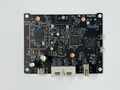 Board Top
 -
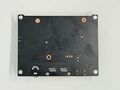 Board Bottom


See also
 | This article's use of red links may need cleanup. |
|
|
Categories:
- Cudy
- Embedded system/VPN Router
- Embedded system/travel router
- Embedded system/wireless router
- Embedded System MediaTek
- Embedded System MT7628AN
- MediaTek
- Embedded System MIPS 24KEc
- Embedded System
- OpenWrt Supported
- Has Mimo Status
- Embedded System IEEE 802.11b/g/n
- Embedded System MT7613BEN
- Embedded System IEEE 802.11a/n/ac
- Dual-Radio Wireless Embedded System
- Wireless Embedded System
- Dual-Band
- English Documentation


